
Up until now I used VPatch for all my patches. The disadvantage of VPatch is that it uses strict MD5 hash checks. This means that a patch can only be applied to exactly the same file the patch was based on (exact same build and language).
Because many people are asking for patches for other builds and languages I decided to move over to another patch mechanism. This will use search & replace on specific Hex bytes.
The consequence is that patching another build or language version is possible. However there is no absolute certaintity that the patch will work on other builds or languages. Ofcourse the patcher will only patch if the specific bytes were found which is safer than patching an offset.
It’s up to the user to carefully test the patched file and hopefully report back to me if it’s working.
Now I will describe how to use this universal patcher.
First step is you need to download the tool that “compiles” the patch from an external site (link is below the article) called DUP2. Extract the archive content to a folder on your drive (I will assume it to be C:\Program Files\DUP2). Please note that I am not the author of this tool nor do I even know the author.
Next step is you download the .dup2 project file for the patch you’d like to use. Place this in the Projects subfolder of DUP2.
Now doubleclick the downloaded .dup2 file and click on the “Create Patch” button:

Now you will be asked to save the patch.exe file somewhere:

Close DUP2 and start the saved exe file (make sure the file you want to patch is in the same directory as the patch.exe), this will show you a screen similar to the screenshot below:
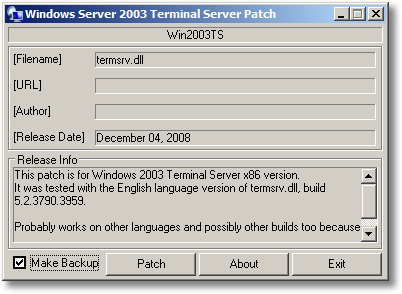
Click on the Patch button to patch the file, a backup with the added .BAK extension will automatically be created.
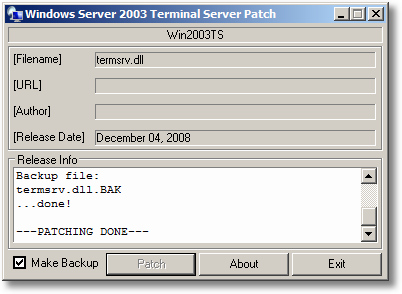
That’s all!
Please do not distribute patch.exe files, they are for personal use only.
DUP2 Link: here

[...] patch uses a new patch engine which I described here. If you have tested the patch on a different language and/or build of termsrv.dll please report [...]
hi,
Now doubleclick the download .dup2 file?????
lol?
thanks
@Petkoj: tx for pointing the typo ;-) should be downloaded ofcouse...
[...] is the dup2 file: Group Policy Client Service Patch [...]
[...] you would like to patch your kernel you can download the dUP2 file below. Please check if creating and/or using this patch is legal according to your [...]
Hi Remko,
Does this patching tool work with Win7? I'm specifically looking for a patch for Win7 Home Premium (x86 & x64) to enable RDP Host & concurrent sessions.
Cheers : )
i have win 7 32_bit
4gb ram
but in properties it shows 4gb ram(2gb usable )
how can i solve it by this patcher
hi and thanks for the patch
a problem i have is that when i press the patch button it comes with a message: :cannot find the file search for the file?
the patch is on the same file with termsrv.dll
what i do wrong?
thanks again and sorry for my bad english
How can I tell which file to patch in case I want to patch a program and where can I get that file. Is it from the program files or somewhere.
There is not project file for x86, there is only for x64 :(
the dup2 project file which i downloaded seeks for the file ntkrnlpa.exe to change. when i click patch it says that the file is in use and can't be accessed...what to do?
Hi there i cannot find the project file to download i m trying your other method but gives error i want to try this method.. please send me project file as soon as possible please.. for server 2003 R2 SP2 STD
Where can I find the download of the dup2 files?
Thank you
Hiya. Mainly want to comment and express that I valued this post. I'll be bookmarking your weblog and browsing to find out if you post any new ones. Thanks so much!
Guys I have make everything right but when I am going to execute the patch it creates the backup file but I take this error:
A foto from where I have put the patch in the right folder:
http://imagestorming.com/media/g0x/1324602147/1.png
And here a foto after running the patch:
http://imagestorming.com/media/3f8/1324602167/2.png
Help please I beg of you.
How about memory based patching?