Remko Weijnen's Blog (Remko's Blog)
About Virtualization, VDI, SBC, Application Compatibility and anything else I feel like
I’m working on a new build of TSAdminEx for which I need to query the total amount of physical memory. Locally we can use the GlobalMemoryStatusEx API but there’s no API to do this remotely. It would be possible using WMI but I decided not to use that because I dislike it because of it’s slowness and I need support for older OS versions which might not have WMI.
So I found in the registry the following key:
HKLM\HARDWARE\RESOURCEMAP\System Resources\Physical Memory
It has a value .Translated of type RES_RESOURCE_LIST which seems undocumented besides stating that it exists. Regedit knows how to handle it though. If you doubleclick on the key you will see something like this:
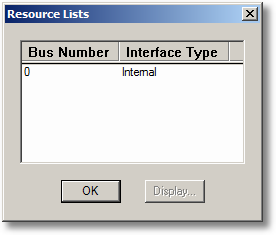
If we click on the list and choose display we see the following:
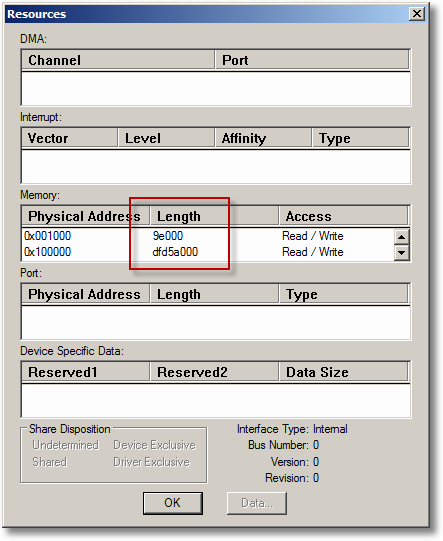
If we sum the Length of all memory blocks we get the total amount of Physical Memory. I wondered how to do this programmatically so I Googled on it but found mostly pages where the values are extracted at fixed offsets rather than knowing the correct structure. I found however that the structure is present in the DDK (wdm.h) and is called CM_RESOURCE_LIST. I was also lucky because Jack van Nuenen had already done a conversion of those headers to Delphi which saved me some work. I did some small modifications to the headers and included them in a new unit into the Jedi Apilib (JwaWdm.pas).
Let’s take a look at the structure:
1 2 3 4 5 | CM_RESOURCE_LIST = packed record Count: ULONG; List: array[0..ANYSIZE_ARRAY-1] of CM_FULL_RESOURCE_DESCRIPTOR; end; PCM_RESOURCE_LIST = ^CM_RESOURCE_LIST; |
ANYSIZE_ARRAY is a constant from the Windows PSDK which is meant to make a dummy array, so here we make actually an array[0..0]. However the compiler permits us to do array[1], array[2] if we turn off range checking so this makes it easier to loop through the array.
The CM_FULL_RESOURCE_DESCRIPTOR describes the resource:
1 2 3 4 5 6 | CM_FULL_RESOURCE_DESCRIPTOR = packed record InterfaceType: ULONG;//INTERFACE_TYPE; BusNumber: ULONG; PartialResourceList: CM_PARTIAL_RESOURCE_LIST; end; PCM_FULL_RESOURCE_DESCRIPTOR = ^CM_FULL_RESOURCE_DESCRIPTOR; |
And finally points to a CM_PARTIAL_RESOURCE_LIST structure:
1 2 3 4 5 6 7 | CM_PARTIAL_RESOURCE_LIST = packed record Version: USHORT; Revision: USHORT; Count: ULONG; PartialDescriptors: array[0..ANYSIZE_ARRAY-1] of CM_PARTIAL_RESOURCE_DESCRIPTOR; end; PCM_PARTIAL_RESOURCE_LIST = ^CM_PARTIAL_RESOURCE_LIST; |
Which in turn points to an array of CM_PARTIAL_RESOURCE_DESCRIPTOR structures:
1 2 3 4 5 6 7 8 9 10 11 12 13 14 15 | CM_PARTIAL_RESOURCE_DESCRIPTOR = packed record ResType: UCHAR; ShareDisposition: CM_SHARE_DISPOSITION; // has UCHAR = Byte size Flags: USHORT; case Byte of 0: (Generic: RDD_Generic); 1: (Port: RDD_Port); 2: (Interrupt: RDD_Interrupt); 3: (Memory: RDD_Memory); 4: (Dma: RDD_DMA); 5: (DevicePrivate: RDD_DevicePrivate); 6: (BusNumber: RDD_BusNumber); 7: (DeviceSpecificData: RDD_DeviceSpecificData); end; PCM_PARTIAL_RESOURCE_DESCRIPTOR = ^CM_PARTIAL_RESOURCE_DESCRIPTOR; |
We are interested in the RDD_MEMORY structure which finally gives us the requested information (Length):
1 2 3 4 5 | RDD_MEMORY = packed record Start: PHYSICAL_ADDRESS; Length: ULONG; end; PRDD_MEMORY = ^RDD_MEMORY; |
So it’s just a matter of looping through the Partial Descriptor array and summing up the Lengths. However on a x64 (64 bit) Windows the memory length is a 8 bytes instead of 4 byte, so we need to account for that. If we use a 64 bit compiler it will handle this automatically because the ULONG type is 8 bytes then. That will make it impossible though to query remote 32 bit systems from 64 bit or vice versa. So I wondered how Taskmanager handled that, the answer is: IT DOESN’T! See the following example:
Querying locally on 32 bit system:
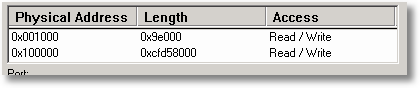
Now I query the same machine remotely from a 64 bit system:
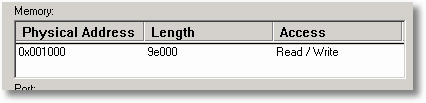
I think it can only be solved by using two different structures, one for x86 and one for x64. So I introduced the following structures:
1 2 3 4 5 6 7 8 9 10 11 12 13 14 15 16 17 18 19 20 21 22 23 | // This is for x64 CM_PARTIAL_RESOURCE_DESCRIPTOR_EX = packed record ResType: UCHAR; ShareDisposition: CM_SHARE_DISPOSITION; // has UCHAR = Byte size Flags: USHORT; case Byte of 0: (Generic: RDD_GENERIC_EX); 1: (Port: RDD_PORT_EX); 2: (Interrupt: RDD_INTERRUPT_EX); 3: (Memory: RDD_MEMORY_EX); 4: (Dma: RDD_DMA); 5: (DevicePrivate: RDD_DevicePrivate); 6: (BusNumber: RDD_BusNumber); 7: (DeviceSpecificData: RDD_DeviceSpecificData); end; PCM_PARTIAL_RESOURCE_DESCRIPTOR_EX = ^CM_PARTIAL_RESOURCE_DESCRIPTOR_EX; // This is for x64 RDD_MEMORY_EX = packed record Start: PHYSICAL_ADDRESS; Length: ULONGLONG; end; PRDD_MEMORY_EX = ^RDD_MEMORY_EX; |
Now we need a generic function to query both x86 and x64 (I use the Environment variable PROCESSOR_ARCHITECTURE to determine if a system is 64bit):
1 2 3 4 5 6 7 8 9 10 11 12 13 14 15 16 17 18 19 20 21 22 23 24 25 26 27 28 29 30 31 32 33 34 35 36 37 38 39 40 41 42 43 44 45 46 47 48 49 50 51 52 53 54 55 56 57 58 59 60 61 62 63 64 65 66 67 68 69 70 71 72 73 74 75 76 77 78 79 80 81 82 83 84 85 86 87 88 89 90 91 92 93 94 95 96 97 98 99 100 101 102 103 104 105 106 107 108 109 110 111 112 113 114 115 116 117 118 119 120 121 122 123 124 125 126 127 128 129 130 131 132 133 134 135 | { This functions reads out the total amount of Physical Memory in Bytes for local or remote systems using the registry. Locally user rights are needed but for Remote Systems admin righs are needed. If reading the memory fails (eg because of access denied) the returned result is 0, any exceptions are surpressed } function GetPhysicalMemoryFromRegistry(const Machine: String = ''): Int64; const EnvKey: String = '\SYSTEM\CurrentControlSet\Control\Session Manager\Environment'; EnvVal: String = 'PROCESSOR_ARCHITECTURE'; PhysMemKey: String = '\HARDWARE\RESOURCEMAP\System Resources\Physical Memory'; PhysMemVal: String = '.Translated'; var Is64Bit: Boolean; Reg: TRegistry; RootKey: HKEY; cbSize: Integer; ResourceListPtr: PCM_RESOURCE_LIST; PartDescript: PCM_PARTIAL_RESOURCE_DESCRIPTOR; PartDescriptEx: PCM_PARTIAL_RESOURCE_DESCRIPTOR_EX; Index: Integer; Counter: Integer; s: string; begin // Default result = 0 Result := 0; ResourceListPtr := nil; // Prepend \\ to machinename if needed s := Machine; if Pos('\\', s) <> 0 then begin s := '\\' + s; end; { Connect to (remote) Registry. Please note there is a bug in Windows 2003 SP1 from http://support.microsoft.com/kb/906570: After you apply Microsoft Windows Server 2003 Service Pack 1 (SP1) or install an x64-based version of Windows Server 2003, a custom program that uses the RegConnectRegistry function can no longer access the registry of a remote computer. I was not able to test if this bug prevents us from reading the value remotely } if RegConnectRegistry(PChar(Machine), HKEY_LOCAL_MACHINE, RootKey) <> ERROR_SUCCESS then begin Exit; end; Reg := TRegistry.Create; try Reg.RootKey := RootKey; { First we read out the Environment variable PROCESSOR_ARCHITECTURE to determine is the system is x86 or x64 } if Reg.OpenKeyReadOnly(EnvKey) then begin try { Both intel and Amd 64 bit systems have the value AMD64 } Is64Bit := CompareText(Reg.ReadString(EnvVal), 'AMD64') = 0; // Now open the Physical Memory key if Reg.OpenKeyReadOnly(PhysMemKey) then begin { Get Value Size in bytes } cbSize := Reg.GetDataSize(PhysMemVal); { Check is Size > 0 } if cbSize > 0 then begin { Allocate and zero Memory } ResourceListPtr := AllocMem(cbSize); { Read data into ResourceListPtr var } Reg.ReadBinaryData(PhysMemVal, ResourceListPtr^, cbSize); { Loop throught the ResourceList(s), usually it's only 1 } for Index := 0 to ResourceListPtr^.Count-1 do begin { x64 systems have a slightly different structure because the memory size parameter is not ULONG but ULONGLONG. To solve this we assign the PartialDescriptors array to 2 pointers. } PartDescript := @ResourceListPtr^.List[Index].PartialResourceList.PartialDescriptors; // x86 PartDescriptEx := @ResourceListPtr^.List[Index].PartialResourceList.PartialDescriptors; // x64 for Counter := 0 to ResourceListPtr^.List[Index].PartialResourceList.Count - 1 do begin begin if Is64Bit then { for x64 we use PartDescriptEx } begin { Check if the Resourcetype = Memory and that the memory is read/write } if (PartDescriptEx.ResType = CmResourceTypeMemory) and (PartDescriptEx.Flags = CM_RESOURCE_MEMORY_READ_WRITE) then begin Result := Result + PartDescriptEx.Memory.Length; end; { The Inc operator increases the pointer by SizeOf(PartDescriptEx^) which jumps to the next item in the array } Inc(PartDescriptEx); end else begin { for x86 we use PartDescript } { Check if the Resourcetype = Memory and that the memory is read/write } if (PartDescript.ResType = CmResourceTypeMemory) and (PartDescript.Flags = CM_RESOURCE_MEMORY_READ_WRITE) then begin Result := Result + PartDescript.Memory.Length; end; { The Inc operator increases the pointer by SizeOf(PartDescriptEx^) which jumps to the next item in the array } Inc(PartDescript); end; end; end; end; end; end; except { Return 0 on any exception } Result := 0; end; { Free the memory } if ResourceListPtr <> nil then FreeMem(ResourceListPtr); PartDescript := nil; PartDescriptEx := nil; end; finally { Close the key } RegCloseKey(RootKey); FreeAndNil(Reg); end; end; |
Profile



Top Posts
- Query Active Directory from Excel
- RNS 510 Startup Logo–My thoughts
- Adding a hidden Exchange mailbox to Outlook
- How rdp passwords are encrypted
- Get Actual CPU Clock Speed with PowerShell
- ClickOnce Applications in Enterprise Environments
- VW RNS 510 Navigation Startup Pictures
- Unattended Installation of IBM System i Access for Windows
- Reading physical memory size from the registry
- Show Client IP Address when using NetScaler as a Reverse Proxy
Recent Comments
Featured Downloads
- AClientFix (13595 downloads )
- AddPrinter2.zip (12854 downloads )
- AdProps (12379 downloads )
- AdSample1 (11432 downloads )
- AMD Radeon Crimson ReLive (29773 downloads )
- Atheros Driver (34019 downloads )
- AutoLogonXP 1.0 (11404 downloads )
- CDZA (9560 downloads )
- ChDrvLetter.zip (11217 downloads )
- ChDrvLetter.zip (14356 downloads )
Blogroll
- Andrew Morgan
- Arnout’s blog
- Assa’s Blog
- Barry Schiffer
- Delphi Praxis
- Ingmar Verheij
- Jedi Api Blog
- Jedi API Library
- Jeroen Tielen
- Kees Baggerman
Categories
- .NET (4)
- Active Directory (28)
- Altiris (36)
- App-V (1)
- Apple (5)
- Application Compatibility (11)
- Automotive (5)
- AWS (1)
- BootCamp (1)
- C# (6)
- C++ (2)
- Citrix (87)
- Delphi (61)
- Embedded (4)
- Exchange (16)
- General (71)
- iPhone (5)
- Java (8)
- Linux (1)
- Lync (2)
- NetScaler (1)
- Oracle (4)
- Other (1)
- Packaging (19)
- PowerShell (56)
- Programming (79)
- Quest (1)
- RES (7)
- script (22)
- ShareFile (1)
- SQL Server (10)
- Strange Error (3)
- Terminal Server (68)
- ThinApp (3)
- ThinKiosk (1)
- Ubuntu (1)
- Unattended Installation (19)
- Uncategorized (51)
- UWP (2)
- Vista (37)
- Visual Studio (1)
- VMWare (26)
- Windows 10 (2)
- Windows 2003 (30)
- Windows 2008 (37)
- Windows 2008 R2 (16)
- Windows 2012 (2)
- Windows 7 (30)
- Windows 8 (4)
- Windows Internals (12)
- Windows XP (16)
Archives
- February 2023 (1)
- October 2022 (3)
- July 2022 (1)
- June 2022 (2)
- October 2019 (1)
- March 2018 (1)
- January 2018 (4)
- December 2017 (3)
- April 2017 (1)
- March 2017 (5)
- February 2017 (4)
- May 2016 (3)
- March 2016 (1)
- October 2015 (2)
- September 2015 (1)
- January 2015 (1)
- August 2014 (1)
- July 2014 (8)
- May 2014 (1)
- November 2013 (1)
- October 2013 (2)
- September 2013 (3)
- August 2013 (4)
- June 2013 (2)
- May 2013 (3)
- April 2013 (5)
- March 2013 (5)
- February 2013 (1)
- January 2013 (5)
- December 2012 (9)
- November 2012 (3)
- October 2012 (3)
- August 2012 (4)
- July 2012 (2)
- June 2012 (1)
- May 2012 (6)
- March 2012 (13)
- February 2012 (12)
- January 2012 (9)
- December 2011 (9)
- November 2011 (4)
- October 2011 (5)
- September 2011 (10)
- August 2011 (10)
- July 2011 (2)
- June 2011 (8)
- May 2011 (12)
- April 2011 (4)
- March 2011 (14)
- February 2011 (8)
- January 2011 (32)
- December 2010 (23)
- November 2010 (19)
- October 2010 (10)
- September 2010 (6)
- August 2010 (1)
- July 2010 (1)
- June 2010 (6)
- March 2010 (7)
- February 2010 (3)
- December 2009 (3)
- November 2009 (11)
- September 2009 (2)
- July 2009 (1)
- June 2009 (5)
- May 2009 (1)
- April 2009 (2)
- March 2009 (3)
- February 2009 (6)
- January 2009 (3)
- December 2008 (8)
- November 2008 (5)
- October 2008 (3)
- September 2008 (3)
- August 2008 (3)
- June 2008 (6)
- May 2008 (2)
- April 2008 (3)
- March 2008 (5)
- January 2008 (3)
- December 2007 (3)
- November 2007 (13)
- October 2007 (10)
Leave a reply