Remko Weijnen's Blog (Remko's Blog)
About Virtualization, VDI, SBC, Application Compatibility and anything else I feel like
Today I reused a unit I wrote a long time ago for TSAdminEx that shows Resource Dialogs from DLL’s or Executables. I wrote it for a couple of reasons:
- Reusing existing dialogs is conventient since the user already knows it.
- Windows takes care of translating it into the user’s language.
- I am too lazy to recreate them 😉
The code is hardly rocket science and could probably be improved and made more sophisticated but it works for me. I decided to share it since you may find it usefull.
Here is a small usage example that shows the Reset Password dialog from Active Directory Users & Computers. This dialog is in dsadmin.dll (on Windows Vista/7 you will find it in ds.admin.dll.mui in the language subfolder eg %systemroot%\system32\en-US but you can load it using just the dll name).
It looks like this:
1 2 3 4 5 6 7 8 9 10 11 12 13 14 15 16 17 18 | 215 DIALOGEX 0, 0, 252, 139 STYLE DS_MODALFRAME | DS_CONTEXTHELP | WS_POPUP | WS_CAPTION | WS_SYSMENU EXSTYLE WS_EX_CONTEXTHELP CAPTION "Reset Password" LANGUAGE LANG_ENGLISH, SUBLANG_ENGLISH_US FONT 8, "MS Shell Dlg" { CONTROL "&New password:", -1, STATIC, SS_LEFT | WS_CHILD | WS_VISIBLE | WS_GROUP, 7, 10, 79, 10 CONTROL "", 220, EDIT, ES_LEFT | ES_PASSWORD | ES_AUTOHSCROLL | WS_CHILD | WS_VISIBLE | WS_BORDER | WS_TABSTOP, 92, 7, 153, 14 CONTROL "&Confirm password:", -1, STATIC, SS_LEFT | WS_CHILD | WS_VISIBLE | WS_GROUP, 7, 28, 79, 10 CONTROL "", 222, EDIT, ES_LEFT | ES_PASSWORD | ES_AUTOHSCROLL | WS_CHILD | WS_VISIBLE | WS_BORDER | WS_TABSTOP, 92, 25, 153, 14 CONTROL "&User must change password at next logon", 261, BUTTON, BS_AUTOCHECKBOX | BS_LEFT | BS_TOP | BS_MULTILINE | WS_CHILD | WS_VISIBLE | WS_TABSTOP, 7, 46, 237, 10 CONTROL "The user must logoff and then logon again for the change to take effect.", -1, STATIC, SS_LEFT | WS_CHILD | WS_VISIBLE | WS_GROUP, 14, 61, 231, 8 CONTROL "", 8327, STATIC, SS_LEFT | WS_CHILD | WS_VISIBLE | WS_GROUP, 7, 76, 238, 16 CONTROL "Unlock the user's &account", 8328, BUTTON, BS_AUTOCHECKBOX | BS_LEFT | BS_TOP | BS_MULTILINE | WS_CHILD | WS_VISIBLE | WS_TABSTOP, 14, 96, 230, 10 CONTROL "OK", 1, BUTTON, BS_DEFPUSHBUTTON | WS_CHILD | WS_VISIBLE | WS_TABSTOP, 140, 118, 50, 14 CONTROL "Cancel", 2, BUTTON, BS_PUSHBUTTON | WS_CHILD | WS_VISIBLE | WS_TABSTOP, 195, 118, 50, 14 } |
The code to display it in Delphi looks like this:
1 2 3 4 5 6 7 8 9 10 11 12 13 14 15 16 17 18 19 20 | procedure TMainForm.ChangePasswordExecute(Sender: TObject); const NewPasswordId = 220; ConfirmPasswordId = 222; var ResDialog: TResDialog; NewPassword: TResControl; ConfirmPassword: TResControl; begin ResDialog := TResDialog.Create(Handle, 'dsadmin.dll', 215, InitChangePassword); NewPassword := ResDialog.Controls.FindByResourceId(NewPasswordId); ConfirmPassword := ResDialog.Controls.FindByResourceId(ConfirmPasswordId); if Assigned(NewPassword) and Assigned(ConfirmPassword) then begin ShowMessageFmt('New Password = %s Confirm Password =%s', [NewPassword.Text, ConfirmPassword.Text]); end; ResDialog.Free; end; |
The Constructor takes the following parameters:
- Parent Window Handle
- DLL or Exe name
- Dialog Resource Id
- Optional: A procedure that is called before displaying the dialog where you can init the controls.
My init procedure looks like this:
1 2 3 4 5 6 7 8 9 10 11 12 13 14 15 16 17 18 19 | procedure InitChangePassword(ResourceControlListPtr: PResControls); const MustChangeId = 261; UnlockId = 8328; var MustChange: TResControl; Unlock: TResControl; begin MustChange := ResourceControlListPtr^.FindByResourceId(MustChangeId); if Assigned(MustChange) then begin MustChange.Checked := True; end; Unlock := ResourceControlListPtr^.FindByResourceId(UnlockId); if Assigned(Unlock) then begin Unlock.Checked := True; end; end; |
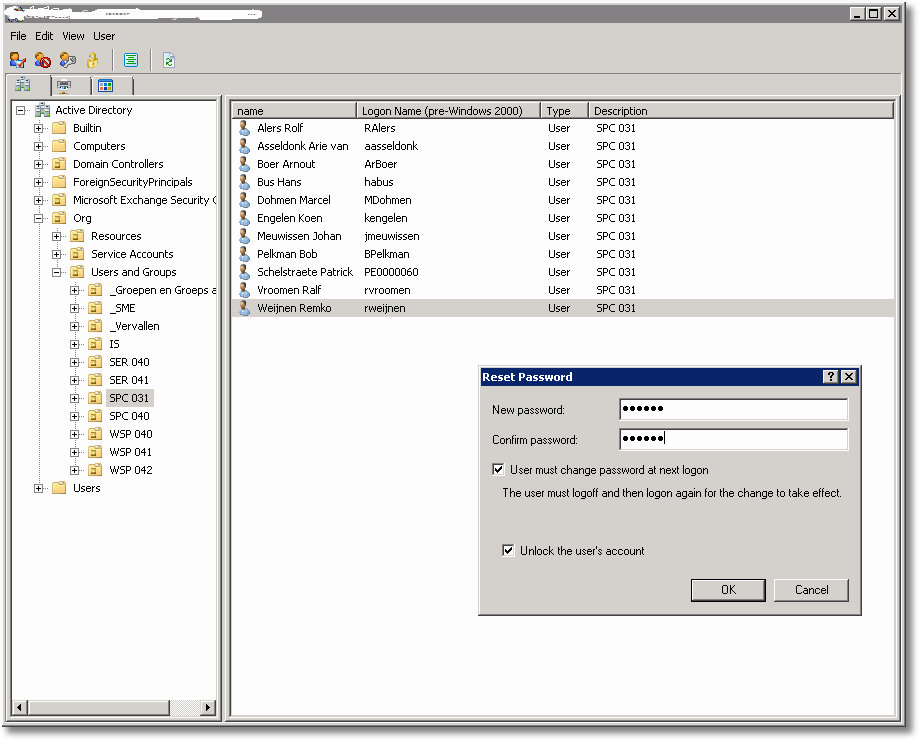
Have fun with it and if you improve something please let me know!
ResDialogs (2445 downloads )Profile



Top Posts
- Query Active Directory from Excel
- RNS 510 Startup Logo–My thoughts
- Adding a hidden Exchange mailbox to Outlook
- How rdp passwords are encrypted
- Get Actual CPU Clock Speed with PowerShell
- ClickOnce Applications in Enterprise Environments
- VW RNS 510 Navigation Startup Pictures
- Unattended Installation of IBM System i Access for Windows
- Reading physical memory size from the registry
- Show Client IP Address when using NetScaler as a Reverse Proxy
Recent Comments
Featured Downloads
- AClientFix (13595 downloads )
- AddPrinter2.zip (12854 downloads )
- AdProps (12379 downloads )
- AdSample1 (11432 downloads )
- AMD Radeon Crimson ReLive (28619 downloads )
- Atheros Driver (34019 downloads )
- AutoLogonXP 1.0 (11404 downloads )
- CDZA (9560 downloads )
- ChDrvLetter.zip (11217 downloads )
- ChDrvLetter.zip (14356 downloads )
Blogroll
- Andrew Morgan
- Arnout’s blog
- Assa’s Blog
- Barry Schiffer
- Delphi Praxis
- Ingmar Verheij
- Jedi Api Blog
- Jedi API Library
- Jeroen Tielen
- Kees Baggerman
Categories
- .NET (4)
- Active Directory (28)
- Altiris (36)
- App-V (1)
- Apple (5)
- Application Compatibility (11)
- Automotive (5)
- AWS (1)
- BootCamp (1)
- C# (6)
- C++ (2)
- Citrix (87)
- Delphi (61)
- Embedded (4)
- Exchange (16)
- General (71)
- iPhone (5)
- Java (8)
- Linux (1)
- Lync (2)
- NetScaler (1)
- Oracle (4)
- Other (1)
- Packaging (19)
- PowerShell (56)
- Programming (79)
- Quest (1)
- RES (7)
- script (22)
- ShareFile (1)
- SQL Server (10)
- Strange Error (3)
- Terminal Server (68)
- ThinApp (3)
- ThinKiosk (1)
- Ubuntu (1)
- Unattended Installation (19)
- Uncategorized (51)
- UWP (2)
- Vista (37)
- Visual Studio (1)
- VMWare (26)
- Windows 10 (2)
- Windows 2003 (30)
- Windows 2008 (37)
- Windows 2008 R2 (16)
- Windows 2012 (2)
- Windows 7 (30)
- Windows 8 (4)
- Windows Internals (12)
- Windows XP (16)
Archives
- February 2023 (1)
- October 2022 (3)
- July 2022 (1)
- June 2022 (2)
- October 2019 (1)
- March 2018 (1)
- January 2018 (4)
- December 2017 (3)
- April 2017 (1)
- March 2017 (5)
- February 2017 (4)
- May 2016 (3)
- March 2016 (1)
- October 2015 (2)
- September 2015 (1)
- January 2015 (1)
- August 2014 (1)
- July 2014 (8)
- May 2014 (1)
- November 2013 (1)
- October 2013 (2)
- September 2013 (3)
- August 2013 (4)
- June 2013 (2)
- May 2013 (3)
- April 2013 (5)
- March 2013 (5)
- February 2013 (1)
- January 2013 (5)
- December 2012 (9)
- November 2012 (3)
- October 2012 (3)
- August 2012 (4)
- July 2012 (2)
- June 2012 (1)
- May 2012 (6)
- March 2012 (13)
- February 2012 (12)
- January 2012 (9)
- December 2011 (9)
- November 2011 (4)
- October 2011 (5)
- September 2011 (10)
- August 2011 (10)
- July 2011 (2)
- June 2011 (8)
- May 2011 (12)
- April 2011 (4)
- March 2011 (14)
- February 2011 (8)
- January 2011 (32)
- December 2010 (23)
- November 2010 (19)
- October 2010 (10)
- September 2010 (6)
- August 2010 (1)
- July 2010 (1)
- June 2010 (6)
- March 2010 (7)
- February 2010 (3)
- December 2009 (3)
- November 2009 (11)
- September 2009 (2)
- July 2009 (1)
- June 2009 (5)
- May 2009 (1)
- April 2009 (2)
- March 2009 (3)
- February 2009 (6)
- January 2009 (3)
- December 2008 (8)
- November 2008 (5)
- October 2008 (3)
- September 2008 (3)
- August 2008 (3)
- June 2008 (6)
- May 2008 (2)
- April 2008 (3)
- March 2008 (5)
- January 2008 (3)
- December 2007 (3)
- November 2007 (13)
- October 2007 (10)
2 Responses for "Using Windows Dialogs from Delphi"
[…] few days ago I wrote about Using Windows Dialogs in your own programs, wouldn’t it be nice to be able to use Windows Resource Strings for the […]
Hi!
Sorry, I just can’t do it…
What is the library that contains TResDialog and TResControl?
Please help me!
Congrats for your job! It’s great and I use to subscribe you!
Leave a reply