Remko Weijnen's Blog (Remko's Blog)
About Virtualization, VDI, SBC, Application Compatibility and anything else I feel like
I have created a little tool for myself that I have call Altiris Job Builder, it retreives the Jobs from the Altiris database and shows them in a Treeview.
Then I can assemble a Master Build Job by dragging the needed Jobs to another Treeview on the right. Since it’s just for me it doesn’t have a fancy gui:

So why did I write it? Well I have divided my Jobs into Prerequisites and Packages, for instance IIS and Terminal Server and Java are prereqisuites for Citrix. But many prereqisuites are required for one or more other packages, eg Java is also used for certain applications.I don’t want to make copies of Jobs since that means I have to change it in multiple places. For instance say we upgrade to a new Java version we would need to update multiple jobs instead of one (which is very likely to wrong ).
So the idea behind this master build is to create a Master Build Job that fires off all the needed jobs for a certain package. I use AxSched in an integrated script job for that. So my tool generates something like this:
1 2 3 4 5 6 7 8 9 10 11 12 13 14 15 16 17 18 19 20 21 22 23 24 25 26 27 28 29 30 31 32 | rem My Jobs\PKG\p003.Citrix_Prereqisuites\02.Java AxSched %COMPNAME% -jid 2000266 /t %TIME:~0,5% /ulu rem My Jobs\PKG\p003.Citrix_Prereqisuites\03.Web-Server AxSched %COMPNAME% -jid 2000267 /t %TIME:~0,5% /ulu rem My Jobs\PKG\p003.Citrix_Prereqisuites\05.TS_TerminalServer! AxSched %COMPNAME% -jid 2000269 /t %TIME:~0,5% /ulu rem My Jobs\PKG\p003.Citrix_Prereqisuites\08.VisualJ# AxSched %COMPNAME% -jid 2000272 /t %TIME:~0,5% /ulu rem My Jobs\PKG\p003.Citrix_Prereqisuites\06.CtxClient AxSched %COMPNAME% -jid 2000270 /t %TIME:~0,5% /ulu rem My Jobs\PKG\p015.Citrix_AddServer\02.InstallCitrix! AxSched %COMPNAME% -jid 2000295 /t %TIME:~0,5% /ulu rem My Jobs\PKG\p013.CitrixComponents\01.DeliveryServicesConsole AxSched %COMPNAME% -jid 2000287 /t %TIME:~0,5% /ulu rem My Jobs\PKG\p013.CitrixComponents\02.CMC AxSched %COMPNAME% -jid 2000289 /t %TIME:~0,5% /ulu rem My Jobs\PKG\p013.CitrixComponents\04.HDX AxSched %COMPNAME% -jid 2000290 /t %TIME:~0,5% /ulu rem My Jobs\PKG\p013.CitrixComponents\03.EnableFP2 AxSched %COMPNAME% -jid 2000293 /t %TIME:~0,5% /ulu rem My Jobs\PKG\p014.CitrixHotFixes\01.HotfixRollup6! AxSched %COMPNAME% -jid 2000292 /t %TIME:~0,5% /ulu |
But lazy as I am I don’t want to manually copy/paste this into a job but rather insert it directly into the database. If we look at the eXpress database scheme we can see that there is an event table (a Job is really an Event in Altiris):
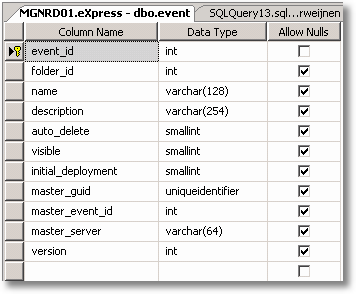
Only the event_id field is mandatory and it’s also the Primary Key of the table. However the event_id is not auto generated so if we insert a new record how do we now the right value for event_id?
One approach could be to read the highest value and increment that by 1 but that seems dangerous for various reasons. So I figured there was probably a Stored Procedure for adding a new Job/Event.
In the SQL Server Management Studio we can find Stored Procedures under the Programmability Node of the Database:
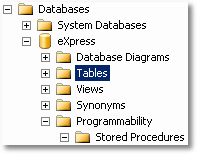
If you look into the available Stored Procedures you will see that there are del_xxx and ins_xxx events. We need the ins_event Stored Procedure:
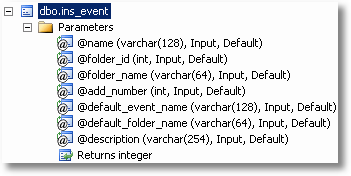
In Delphi we can use the TADOCommand object to call a Stored Procedure:
1 2 3 4 5 6 7 8 9 10 11 12 13 14 15 16 17 18 19 20 21 | function TForm1.AddEvent(const FolderId: Integer; const Name: String; const Description: String=''): Integer; var cmd: TADOCommand; begin Result := -1; cmd := TADOCommand.Create(nil); try cmd.Connection := ADOConnection1; cmd.CommandType := cmdStoredProc; cmd.CommandText := 'ins_event'; cmd.Parameters.Refresh; cmd.Parameters.ParamByName('@name').Value := Name; cmd.Parameters.ParamByName('@folder_id').Value := FolderId; cmd.Parameters.ParamByName('@description').Value := Description; cmd.Execute; Result := cmd.Parameters.ParamValues['@RETURN_VALUE']; finally cmd.Free; end; end; |
The ins_event Stored Procedure returns the new JobId in the @RETURN_VALUE parameter. This is very convenient because we need the JobId to add tasks to the new Job, in this case a script task.
But enough talk for today, I hope you find the subject interesting and I would be very interested to hear about other solutions or concepts for a Master Build Job.
Profile



Top Posts
- Query Active Directory from Excel
- RNS 510 Startup Logo–My thoughts
- Adding a hidden Exchange mailbox to Outlook
- How rdp passwords are encrypted
- Get Actual CPU Clock Speed with PowerShell
- ClickOnce Applications in Enterprise Environments
- VW RNS 510 Navigation Startup Pictures
- Unattended Installation of IBM System i Access for Windows
- Reading physical memory size from the registry
- Show Client IP Address when using NetScaler as a Reverse Proxy
Recent Comments
Featured Downloads
- AClientFix (13595 downloads )
- AddPrinter2.zip (12854 downloads )
- AdProps (12379 downloads )
- AdSample1 (11432 downloads )
- AMD Radeon Crimson ReLive (28452 downloads )
- Atheros Driver (34019 downloads )
- AutoLogonXP 1.0 (11404 downloads )
- CDZA (9560 downloads )
- ChDrvLetter.zip (11217 downloads )
- ChDrvLetter.zip (14356 downloads )
Blogroll
- Andrew Morgan
- Arnout’s blog
- Assa’s Blog
- Barry Schiffer
- Delphi Praxis
- Ingmar Verheij
- Jedi Api Blog
- Jedi API Library
- Jeroen Tielen
- Kees Baggerman
Categories
- .NET (4)
- Active Directory (28)
- Altiris (36)
- App-V (1)
- Apple (5)
- Application Compatibility (11)
- Automotive (5)
- AWS (1)
- BootCamp (1)
- C# (6)
- C++ (2)
- Citrix (87)
- Delphi (61)
- Embedded (4)
- Exchange (16)
- General (71)
- iPhone (5)
- Java (8)
- Linux (1)
- Lync (2)
- NetScaler (1)
- Oracle (4)
- Other (1)
- Packaging (19)
- PowerShell (56)
- Programming (79)
- Quest (1)
- RES (7)
- script (22)
- ShareFile (1)
- SQL Server (10)
- Strange Error (3)
- Terminal Server (68)
- ThinApp (3)
- ThinKiosk (1)
- Ubuntu (1)
- Unattended Installation (19)
- Uncategorized (51)
- UWP (2)
- Vista (37)
- Visual Studio (1)
- VMWare (26)
- Windows 10 (2)
- Windows 2003 (30)
- Windows 2008 (37)
- Windows 2008 R2 (16)
- Windows 2012 (2)
- Windows 7 (30)
- Windows 8 (4)
- Windows Internals (12)
- Windows XP (16)
Archives
- February 2023 (1)
- October 2022 (3)
- July 2022 (1)
- June 2022 (2)
- October 2019 (1)
- March 2018 (1)
- January 2018 (4)
- December 2017 (3)
- April 2017 (1)
- March 2017 (5)
- February 2017 (4)
- May 2016 (3)
- March 2016 (1)
- October 2015 (2)
- September 2015 (1)
- January 2015 (1)
- August 2014 (1)
- July 2014 (8)
- May 2014 (1)
- November 2013 (1)
- October 2013 (2)
- September 2013 (3)
- August 2013 (4)
- June 2013 (2)
- May 2013 (3)
- April 2013 (5)
- March 2013 (5)
- February 2013 (1)
- January 2013 (5)
- December 2012 (9)
- November 2012 (3)
- October 2012 (3)
- August 2012 (4)
- July 2012 (2)
- June 2012 (1)
- May 2012 (6)
- March 2012 (13)
- February 2012 (12)
- January 2012 (9)
- December 2011 (9)
- November 2011 (4)
- October 2011 (5)
- September 2011 (10)
- August 2011 (10)
- July 2011 (2)
- June 2011 (8)
- May 2011 (12)
- April 2011 (4)
- March 2011 (14)
- February 2011 (8)
- January 2011 (32)
- December 2010 (23)
- November 2010 (19)
- October 2010 (10)
- September 2010 (6)
- August 2010 (1)
- July 2010 (1)
- June 2010 (6)
- March 2010 (7)
- February 2010 (3)
- December 2009 (3)
- November 2009 (11)
- September 2009 (2)
- July 2009 (1)
- June 2009 (5)
- May 2009 (1)
- April 2009 (2)
- March 2009 (3)
- February 2009 (6)
- January 2009 (3)
- December 2008 (8)
- November 2008 (5)
- October 2008 (3)
- September 2008 (3)
- August 2008 (3)
- June 2008 (6)
- May 2008 (2)
- April 2008 (3)
- March 2008 (5)
- January 2008 (3)
- December 2007 (3)
- November 2007 (13)
- October 2007 (10)
2 Responses for "Altiris Job Builder"
[…] today I wrote about my Altiris Job Builder tool but when I tested the actual produced build job I noticed something weird: the job was […]
[…] to the Server and/or Job context (popupmenu) in DS? I would really like to be able to launch my Job Builder by right clicking a Job or Folder and ideally DS would pass the Folder or Job Id on the […]
Leave a reply