
Earlier today I wrote about Using the CorrectFilePaths shim to redirect an ini file to a writable location and believe it or not the next application I was working with today needed a nice shim as well.
This one was a little more complicated and that’s why I am writing a second post about it.
I am not sure if this is actuall documented somewhere but a Shim is not applied to Applications or DLL’s that reside in the system directory.
The application in question here is a Visual Basic 6 application which uses the VB6 runtime, msvbvm60.dll which resides usually in %systemroot%\system32.
We need to do two things if we want to apply the shim to msvbvm60.dll:
The first is that we need to prepend the -b switch to the CorrectFilePaths shim and the second is that we need to include the module msvbvm60.dll.
Type msvbvm60.dll in the Module name edit and press Add:
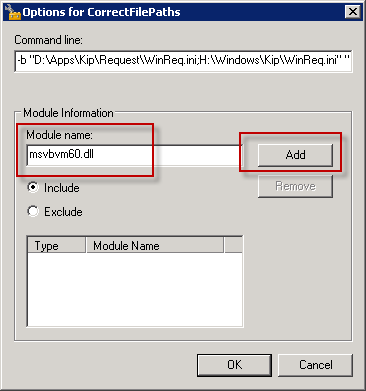
In the case of this Application, called KIP Request 7, I needed to redirect both an ini file in the Application Directory and a whole SubDirectory called Settings.
So the whole Command line for parameters is:
-b "D:\Apps\Kip\Request\WinReq.ini;H:\Windows\Kip\WinReq.ini" "D:\Apps\Kip\Request\Settings;H:\Windows\Kip\Settings"
[...] Dit blogartikel was vermeld op Twitter door Chris Jackson. Chris Jackson heeft gezegd: RT @RemkoWeijnen: Blogged: Using the CorrectFilePaths Shim with Visual Basic Applications http://bit.ly/ezYd6K [...]
[...] Using the CorrectFilePaths Shim with Visual Basic Applications [...]
[...] If you are not familiar with the Application Compability Toolkit please read my earlier post Using the CorrectFilePaths shim to redirect an ini file to a writable location and Using the CorrectFilePaths Shim with Visual Basic Applications. [...]
[...] the Process Monitor screenshot above) so we need to add MSVBVM60.DLL to the include modules (see here for an [...]