Remko Weijnen's Blog (Remko's Blog)
About Virtualization, VDI, SBC, Application Compatibility and anything else I feel like
2,619 views
After updating a Citrix License server from 11.6.1 to 11.10 the Citrix Licensing Service crashed immediately after startup.
In the Event Log the following error was shown:
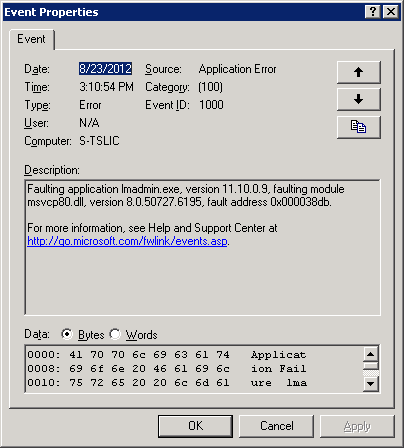
I suspected that there was a corrupt licensing file in the MyFiles folder (Default C:\Program Files\Citrix\Licensing\MyFiles).
 I wanted to call a hash function from a .net executable from my code. My first step was to inspect the executable with Reflector.
The Hash function was in a namespace called Core:
1 2 3 4 5 6 7 8 9 10 11 12 | namespace TheExe.Core { internal static class AssemblyInfo internal static class StringExtensionMethods } internal static class StringExtensionMethods { // Methods public static string Hash(this string original, string password); // More methods... } |
Notice that the Core namespace is marked as internal so it was not meant to be callable outside of the executable. It’s still possible to call it using Reflection:
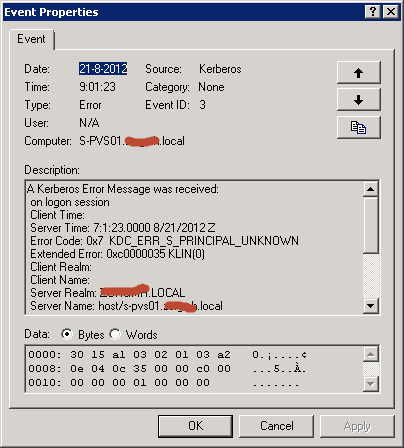
After joining a new Windows 2008 R2 Server to the domain I could not login to the domain.
I would get the following error message:

Additionally the following error was logged in the Eventlog:
 I had to troubleshoot an application that was published with Citrix XenApp. The problem with this application was that it didn’t have an button/icon in the taskbar and the window would sometimes disappear.
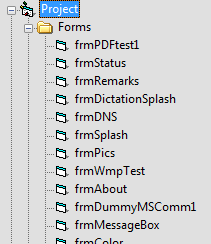
I noticed that this (cr)application was written in Visual Basic, so I decided to run it through a decompilation tool.
The decompiler was able to list the forms used in the Application:
 I am using a PowerShell script to copy some elements of from the users old profile location to a new location. This includes the Nethood ("My Network Places") folder which contains the Network Places shortcuts.
A user reported that she could not save documents to Network Places anymore and after inspection the Network Places shortcuts were broken.
I started comparing the old Nethood folder to the new and observed the following difference in Explorer:

When copying entries from the Nethood folder with Explorer manually they worked fine, so somehow Explorer gives the Nethood folder special treatment.
Today I was asked to troubleshoot an executable that didn’t work correctly on Windows XP Embedded.
On startup it displayed the following message:
1 2 3 4 5 6 7 | Unhandled Exception: System.IO.FileNotFoundException: Could not load file or ass embly 'System.Configuration, Version=2.0.0.0, Culture=neutral, PublicKeyToken=b0 3f5f7f11d50a3a' or one of its dependencies. The system cannot find the path spec ified. File name: 'System.Configuration, Version=2.0.0.0, Culture=neutral, PublicKeyTok en=b03f5f7f11d50a3a' ---> System.IO.DirectoryNotFoundException: The system canno t find the path specified. (Exception from HRESULT: 0x80070003) |
I verified that System.Configuration.dll was present (in C:\Windows\Microsoft.NET\Framework\v2.0.50727).
 I was just browsing through the Options tab in Excel 2010 when I noticed the following setting:

This feature was introduced in Excel 2007.
In the default settings, multi-threaded calculation is Enabled with "Use all processors on this computer".
On a physical desktop this would be the preferred setting since it will make formula calculation as fast as possible.
This morning Arjan Beijer sent me an interesting link to a youtube video about obtaining the Citrix IMA Datastore password using Windbg.
The video shows a method, discovered by Denis Gundarev to obtain the IMA Datastore password. Basically he uses DSMaint.exe and set’s a breakpoint on the call to CryptUnprotectData and then reads the password from memory.
I tried to call the CryptUnprotectData API with the data read from the registry directly but this failed with error NTE_BAD_KEY_STATE, this is defined in winerror.h and it means “Key not valid for use in specified state”.
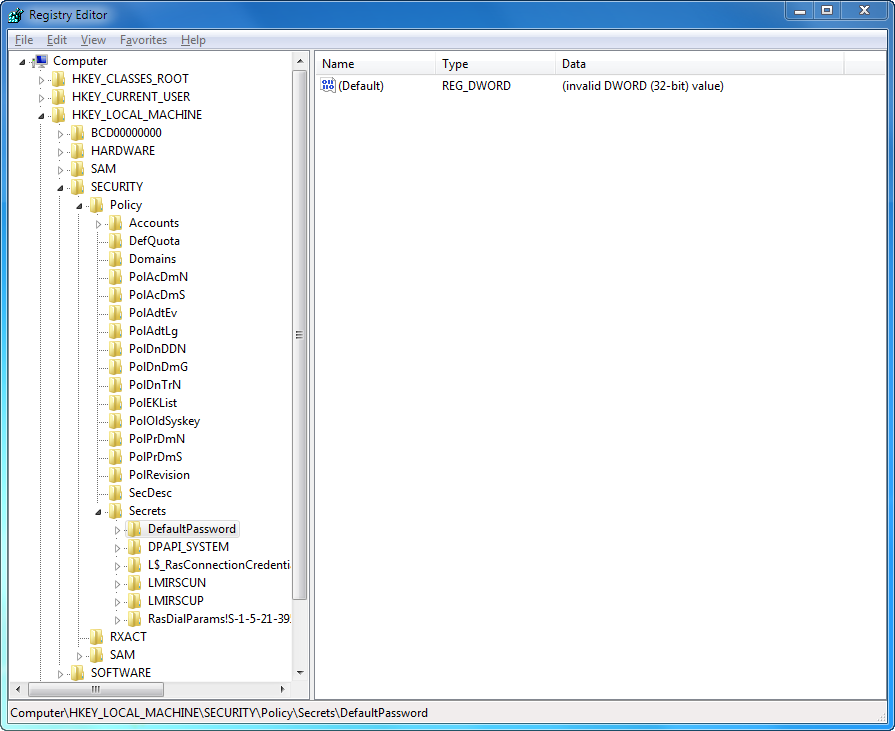
Just a small post today: a small commandline utility that reads the “DefaultPassword” LSA secret.
This secret is stored in the registry under the SECURITY Hive:
After figuring out how to encode and decode the Citrix passwords my next step for the upcoming Citrix Launcher is experiment with config.xml and authenticating to the Citrix Web Interface.
 I imported the NFuse.dtd from the Citrix Web Interface into Delphi with the XML Data Binding Wizard. The results in an NFuse Unit so I can easily create the XML data.
To create an authentication packet I use the following code:
Profile



Top Posts
- Query Active Directory from Excel
- RNS 510 Startup Logo–My thoughts
- Adding a hidden Exchange mailbox to Outlook
- How rdp passwords are encrypted
- Get Actual CPU Clock Speed with PowerShell
- ClickOnce Applications in Enterprise Environments
- VW RNS 510 Navigation Startup Pictures
- Unattended Installation of IBM System i Access for Windows
- Reading physical memory size from the registry
- Show Client IP Address when using NetScaler as a Reverse Proxy
Recent Comments
Featured Downloads
- AClientFix (13595 downloads )
- AddPrinter2.zip (12854 downloads )
- AdProps (12379 downloads )
- AdSample1 (11432 downloads )
- AMD Radeon Crimson ReLive (28551 downloads )
- Atheros Driver (34019 downloads )
- AutoLogonXP 1.0 (11404 downloads )
- CDZA (9560 downloads )
- ChDrvLetter.zip (11217 downloads )
- ChDrvLetter.zip (14356 downloads )
Blogroll
- Andrew Morgan
- Arnout’s blog
- Assa’s Blog
- Barry Schiffer
- Delphi Praxis
- Ingmar Verheij
- Jedi Api Blog
- Jedi API Library
- Jeroen Tielen
- Kees Baggerman
Categories
- .NET (4)
- Active Directory (28)
- Altiris (36)
- App-V (1)
- Apple (5)
- Application Compatibility (11)
- Automotive (5)
- AWS (1)
- BootCamp (1)
- C# (6)
- C++ (2)
- Citrix (87)
- Delphi (61)
- Embedded (4)
- Exchange (16)
- General (71)
- iPhone (5)
- Java (8)
- Linux (1)
- Lync (2)
- NetScaler (1)
- Oracle (4)
- Other (1)
- Packaging (19)
- PowerShell (56)
- Programming (79)
- Quest (1)
- RES (7)
- script (22)
- ShareFile (1)
- SQL Server (10)
- Strange Error (3)
- Terminal Server (68)
- ThinApp (3)
- ThinKiosk (1)
- Ubuntu (1)
- Unattended Installation (19)
- Uncategorized (51)
- UWP (2)
- Vista (37)
- Visual Studio (1)
- VMWare (26)
- Windows 10 (2)
- Windows 2003 (30)
- Windows 2008 (37)
- Windows 2008 R2 (16)
- Windows 2012 (2)
- Windows 7 (30)
- Windows 8 (4)
- Windows Internals (12)
- Windows XP (16)
Archives
- February 2023 (1)
- October 2022 (3)
- July 2022 (1)
- June 2022 (2)
- October 2019 (1)
- March 2018 (1)
- January 2018 (4)
- December 2017 (3)
- April 2017 (1)
- March 2017 (5)
- February 2017 (4)
- May 2016 (3)
- March 2016 (1)
- October 2015 (2)
- September 2015 (1)
- January 2015 (1)
- August 2014 (1)
- July 2014 (8)
- May 2014 (1)
- November 2013 (1)
- October 2013 (2)
- September 2013 (3)
- August 2013 (4)
- June 2013 (2)
- May 2013 (3)
- April 2013 (5)
- March 2013 (5)
- February 2013 (1)
- January 2013 (5)
- December 2012 (9)
- November 2012 (3)
- October 2012 (3)
- August 2012 (4)
- July 2012 (2)
- June 2012 (1)
- May 2012 (6)
- March 2012 (13)
- February 2012 (12)
- January 2012 (9)
- December 2011 (9)
- November 2011 (4)
- October 2011 (5)
- September 2011 (10)
- August 2011 (10)
- July 2011 (2)
- June 2011 (8)
- May 2011 (12)
- April 2011 (4)
- March 2011 (14)
- February 2011 (8)
- January 2011 (32)
- December 2010 (23)
- November 2010 (19)
- October 2010 (10)
- September 2010 (6)
- August 2010 (1)
- July 2010 (1)
- June 2010 (6)
- March 2010 (7)
- February 2010 (3)
- December 2009 (3)
- November 2009 (11)
- September 2009 (2)
- July 2009 (1)
- June 2009 (5)
- May 2009 (1)
- April 2009 (2)
- March 2009 (3)
- February 2009 (6)
- January 2009 (3)
- December 2008 (8)
- November 2008 (5)
- October 2008 (3)
- September 2008 (3)
- August 2008 (3)
- June 2008 (6)
- May 2008 (2)
- April 2008 (3)
- March 2008 (5)
- January 2008 (3)
- December 2007 (3)
- November 2007 (13)
- October 2007 (10)