Remko Weijnen's Blog (Remko's Blog)
About Virtualization, VDI, SBC, Application Compatibility and anything else I feel like
12,281 views
I am working on a launcher tool for Citrix XenApp that can not only connect to a published application or published desktop but can also leverage Citrix Workspace Control to reconnect to disconnected and/or active sessions.
There doesn’t seem to be any sdk that exposed the data we need so I am trying to reproduce what the Citrix online plugi-in does.
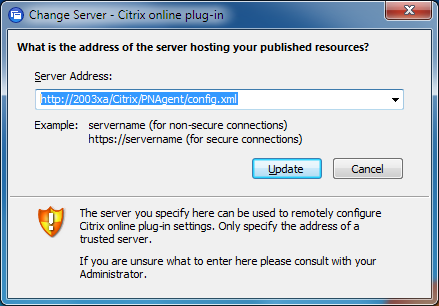
I used a HTTP monitoring tool to capture the traffic between the Online plug-in and the Web Interface. First the online plug-in will retrieve the config.xml from the server specified via the Change Server option:
Setup was unable to verify drive C while installing Windows NT4 Terminal server on VMWare
Author: Remko Weijnen10 May
For a research project I tried to install Windows NT 4 Terminal Server on VMWare Workstation (version 8).
The setup would always fail however with the following error:

Obviously the installation doesn’t really fail because of too little memory and neither is the installation disc (an iso file) corrupt, it’s a bug.
 I needed to dome some Bit Shifting in PowerShell but unfortunately PowerShell lacks operator for Bit Shifting. I searched the .NET Framework for anything that allows for bit shifting but was unable to find anything suitable.
I didn’t want to revert to C# so I implemented shift left and shift right functions in PowerShell.
The code isn’t really pretty and could probably be improved (comments/improvements are welcome!) but here goes (please note that I implemented for bit shifting a byte):
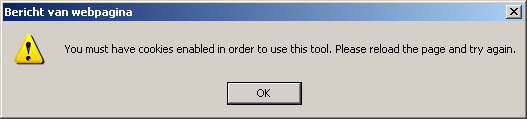
A user reported that the following error while visiting a website on a Citrix XenApp server:
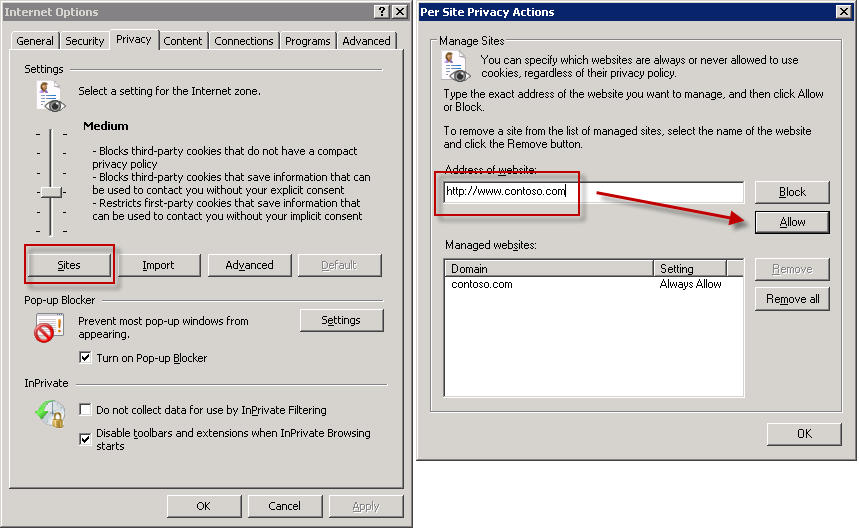
I tried adding the site to the Trusted Sites List and adding the url to the Per Site Privacy list:
But this didn’t work, but I noticed that the site was “flickering” a lot so I suspected that HDX Flash Acceleration was the problem.
I needed to login as root on a Linux based virtual appliance to do some troubleshooting. In my case the appliance was running Suse Linux Enterprise.
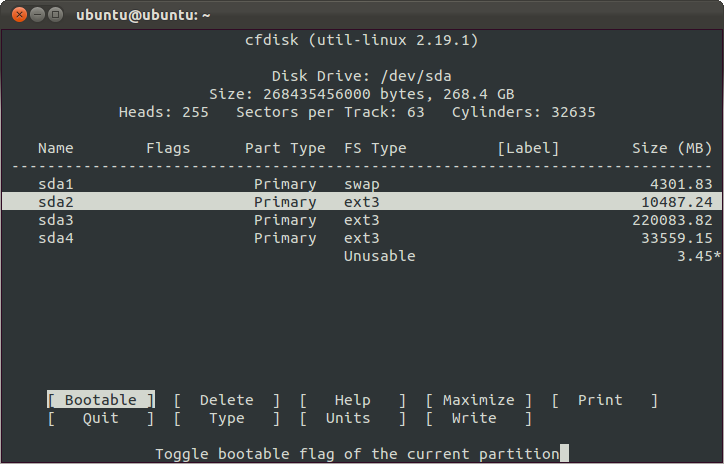
I booted the VA using the Ubuntu Live CD and opened a Terminal. Then I used the cfdisk tool (sudo cfdisk /dev/sda) to view the partitions:
If you want to Create an Active Directory group with PowerShell there are a few things you need to be aware of:
First of all there is no direct way to create new objects in Active Directory. You always need to bind to the Domain or an Organizational Unit and call the Create method.
Example:
1 2 3 4 5 6 | # Bind to OU $ou = [ADSI]"LDAP://OU=OU=Groups,DC=Contoso,DC=COM" # Create the Group $group = $ou.Children.Add("CN=TestGroup", "Group") $group.CommitChanges() |
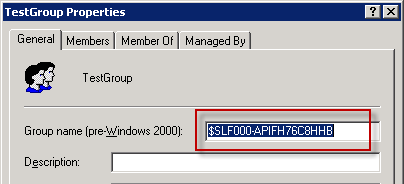
However the group is not yet complete:
When Launching a PowerShell script I noticed the following error: “AuthorizationManager check failed.“
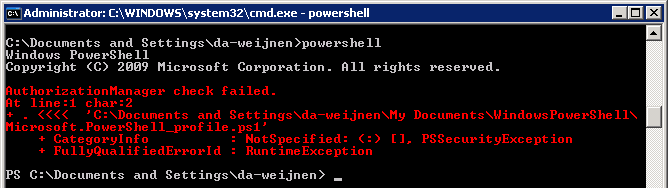
This happens because either the Current User or the All Users PowerShell profile is empty.
 Interesting case today: customer uses Imprivate for two factor logon in combination with Citrix XenApp.
Users reported that logons failed after they had changed their password. After contacting the users we learned that this only happened with special characters in the password like ! and +.
 To do the actual logon to Citrix Imprivata uses an executable which is actually an AutoIT script compiled to an executable.
After authentication the executable get’s the password from the Imprivata Appliance.
I decompiled the executable to source and read the line that passes the password to XenApp:
 Last week I wrote about an error message the users received when opening documents from SharePoint.
The article showed how to fix the problem but it didn’t feel good that I didn’t know where this “TreatAs” value was coming from.
I figured that I could read the timestamp key from the registry to see at what/date time the value was created. This value can be read using the RegQueryInfoKey API but there are various tools that can read it.
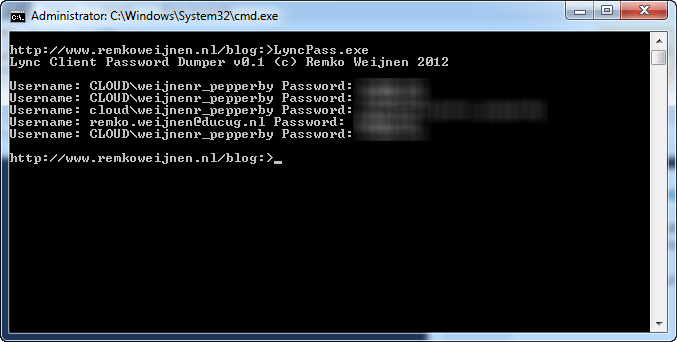
I wrote a small tool that dumps all stored password for the Microsoft Lync Client that I’d like to share here.
It’s a commandline tool that takes no arguments:
Have fun with it!
Lync Password Dumper (8329 downloads )Profile



Top Posts
- Query Active Directory from Excel
- RNS 510 Startup Logo–My thoughts
- Adding a hidden Exchange mailbox to Outlook
- How rdp passwords are encrypted
- Get Actual CPU Clock Speed with PowerShell
- ClickOnce Applications in Enterprise Environments
- VW RNS 510 Navigation Startup Pictures
- Unattended Installation of IBM System i Access for Windows
- Reading physical memory size from the registry
- Show Client IP Address when using NetScaler as a Reverse Proxy
Recent Comments
Featured Downloads
- AClientFix (13595 downloads )
- AddPrinter2.zip (12854 downloads )
- AdProps (12379 downloads )
- AdSample1 (11432 downloads )
- AMD Radeon Crimson ReLive (25997 downloads )
- Atheros Driver (34019 downloads )
- AutoLogonXP 1.0 (11404 downloads )
- CDZA (9560 downloads )
- ChDrvLetter.zip (11217 downloads )
- ChDrvLetter.zip (14356 downloads )
Blogroll
- Andrew Morgan
- Arnout’s blog
- Assa’s Blog
- Barry Schiffer
- Delphi Praxis
- Ingmar Verheij
- Jedi Api Blog
- Jedi API Library
- Jeroen Tielen
- Kees Baggerman
Categories
- .NET (4)
- Active Directory (28)
- Altiris (36)
- App-V (1)
- Apple (5)
- Application Compatibility (11)
- Automotive (5)
- AWS (1)
- BootCamp (1)
- C# (6)
- C++ (2)
- Citrix (87)
- Delphi (61)
- Embedded (4)
- Exchange (16)
- General (71)
- iPhone (5)
- Java (8)
- Linux (1)
- Lync (2)
- NetScaler (1)
- Oracle (4)
- Other (1)
- Packaging (19)
- PowerShell (56)
- Programming (79)
- Quest (1)
- RES (7)
- script (22)
- ShareFile (1)
- SQL Server (10)
- Strange Error (3)
- Terminal Server (68)
- ThinApp (3)
- ThinKiosk (1)
- Ubuntu (1)
- Unattended Installation (19)
- Uncategorized (51)
- UWP (2)
- Vista (37)
- Visual Studio (1)
- VMWare (26)
- Windows 10 (2)
- Windows 2003 (30)
- Windows 2008 (37)
- Windows 2008 R2 (16)
- Windows 2012 (2)
- Windows 7 (30)
- Windows 8 (4)
- Windows Internals (12)
- Windows XP (16)
Archives
- February 2023 (1)
- October 2022 (3)
- July 2022 (1)
- June 2022 (2)
- October 2019 (1)
- March 2018 (1)
- January 2018 (4)
- December 2017 (3)
- April 2017 (1)
- March 2017 (5)
- February 2017 (4)
- May 2016 (3)
- March 2016 (1)
- October 2015 (2)
- September 2015 (1)
- January 2015 (1)
- August 2014 (1)
- July 2014 (8)
- May 2014 (1)
- November 2013 (1)
- October 2013 (2)
- September 2013 (3)
- August 2013 (4)
- June 2013 (2)
- May 2013 (3)
- April 2013 (5)
- March 2013 (5)
- February 2013 (1)
- January 2013 (5)
- December 2012 (9)
- November 2012 (3)
- October 2012 (3)
- August 2012 (4)
- July 2012 (2)
- June 2012 (1)
- May 2012 (6)
- March 2012 (13)
- February 2012 (12)
- January 2012 (9)
- December 2011 (9)
- November 2011 (4)
- October 2011 (5)
- September 2011 (10)
- August 2011 (10)
- July 2011 (2)
- June 2011 (8)
- May 2011 (12)
- April 2011 (4)
- March 2011 (14)
- February 2011 (8)
- January 2011 (32)
- December 2010 (23)
- November 2010 (19)
- October 2010 (10)
- September 2010 (6)
- August 2010 (1)
- July 2010 (1)
- June 2010 (6)
- March 2010 (7)
- February 2010 (3)
- December 2009 (3)
- November 2009 (11)
- September 2009 (2)
- July 2009 (1)
- June 2009 (5)
- May 2009 (1)
- April 2009 (2)
- March 2009 (3)
- February 2009 (6)
- January 2009 (3)
- December 2008 (8)
- November 2008 (5)
- October 2008 (3)
- September 2008 (3)
- August 2008 (3)
- June 2008 (6)
- May 2008 (2)
- April 2008 (3)
- March 2008 (5)
- January 2008 (3)
- December 2007 (3)
- November 2007 (13)
- October 2007 (10)