Remko Weijnen's Blog (Remko's Blog)
About Virtualization, VDI, SBC, Application Compatibility and anything else I feel like
2,616 views
Again an old war story, this time about timezone handling in Outlook/Exchange.
I am not sure which year it was but I had just started to work for a new company and inherited an Exchange 5.5 Server.
The mail had been migrated from an earlier version and calendar data was migrated from Schedule+.
On the first change to Daylight Savings (DTS) all recurring appointments where shown one hour later (or earlier can’t remember) in Outlook. A manual change was not an option: there were over 2000 mailboxes each with a lot of appointments.
We first tried a workaround by disabling DTS on the the workstations and then manually change the time when changing from and to DTS.
But this influenced the timestamps on externals mails and of course appointments with external parties.
After a lot of (and I really mean a lot) of researching I found that Outlook stores all times in an appointment as relative (UTC) time.
Upon display it uses an undocumented TimeZone descriptor field to convert to Local Time.
I just found a very old backup file containing old source code for a few tools I wrote ages ago.
This was in 1997 on my first job for a company called PTT Telecom (the Dutch Telecoms) and I wrote some tools to make life easier.
They were all written in Turbo Pascal and supported Long Filenames when running under Windows ’95 (there was a trick to do that under DOS).
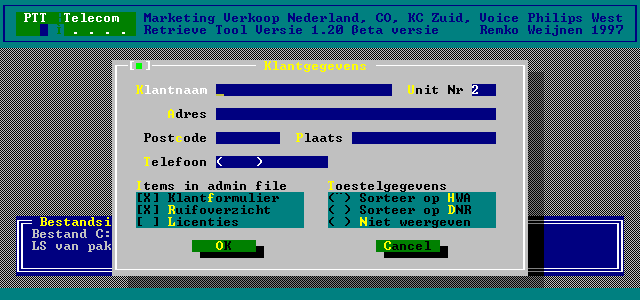
The first tool was called Retreive Tool, it parsed a backup file from a private branch exchange (PBX) and could make reports about Licensing, the hardware in the PBX, Extension numbers and their hardware positions and so on.
If you want to check if you are running on a Server Core edition of Windows you can use the GetProductInfo API.
GetProductInfo takes 4 input parameters that can be obtained using GetVersionEx and the OSVERSIONINFOEX structure:
1 2 3 4 5 6 | var osvi: OSVERSIONINFOEX; begin ZeroMemory(@osvi, SizeOf(osvi)); osvi.dwOSVersionInfoSize := SizeOf(osvi); Win32Check(GetVersionEx(osvi)); |
No we call GetProductInfo:
1 2 3 4 5 | var dwProdType: DWORD; begin Win32Check(GetProductInfo(osvi.dwMajorVersion, osvi.dwMinorVersion, osvi.wServicePackMajor, osvi.wServicePackMinor, dwProdType)); |
A while ago I started exploring the firmware of an RNS510 Navigation unit. The RNS510 is an OEM navigation system, manufactured by Continental Automotive and is used in several models of Volkswagen, Seat and Skoda Cars

When the units is booting it shows a startup logo and I wanted to replace this logo with my own picture.
I needed to delete around 50 scheduled tasks from several machines in Altiris because something went wrong in on of the first jobs.
It would have better if the jobs were configured to fail on error and not continue but they weren’t.
Deleting the jobs from the Altiris console is very, very, slow. First the console asks for confirmation (after showing the hourglass for a long time):
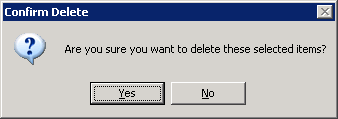
Then the actual delete can take a few minutes and then the next server and so on.
I decided to delete the tasks directly from SQL.
I know this is not preferred but I think in the end it’s safe enough because I found a stored procedure called del_event_schedule which looks like this:
1 2 3 4 5 6 7 8 9 10 11 | ALTER procedure [dbo].[del_event_schedule] @schedule_id int as begin transaction delete from event_schedule where schedule_id = @schedule_id if (@@error != 0) rollback transaction else commit transaction |
So al it does is a (transacted) delete from the table.
I was digging around in termsrv.dll yesterday when I noticed that there are some (well 372 to be exact) SSL certificates inside the Terminal Server binary (termsrv.dll):

Two of them seem to actually contain the private keys as well, but I am not 100% sure it may be just a certificate in another format.
I was deploying virtualized Citrix XenApp Servers on HP BL460c G6 servers and somehow the storage (direct attached) responded very slowly.
I had expected reduced performance (see my earlier post) since I didn’t have the Battery Backed Write Cache module installed.
I did order them but had to start deployment before they arrived.
I did not however expect such an extreme bad performance. Deployment took ages or sometimes failed completely and when logging in to a VM it responded very sluggish.
Disk Latency
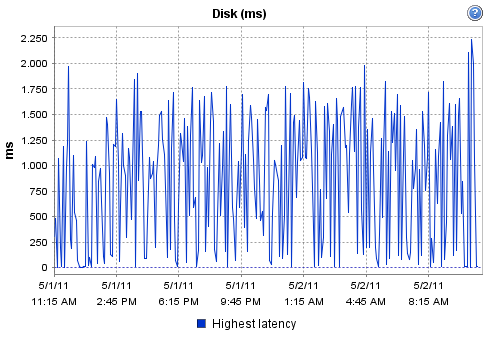
I looked in the vSphere console what the Disk Latency was. Latency under 10ms is usually considered good while a latency between 10 and 20ms is a potential performance problem.
I was shocked to notice that the Disk Latency was much higher with peaks toward 2.000 ms (2 seconds!):
I am currently deploying 64 Citrix XenApp servers with Altiris. The deployment consists of an OS Image, OS Configuration and finally Citrix XenApp and Applications.
In the OS Configuration part the IP configuration needs to be applied and I decided to do this with a database.
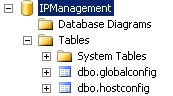
The database consists of 2 tables; one table with the per host settings and one table with the global settings (such as DNS).
In the Altiris job both tables are read from an embedded VBScript and assigned to the NIC.
Database configuration
I created a database (SQL Server) called IPManagement with 2 tables:
I ran into an error when I was upgrading hardware on an HP BL460c G6 Blade.
After placing 2 new (larger) hard drives the Array Configuration would hang after saving the configuration (It just kept blinking “Saving Configuration.” forever.
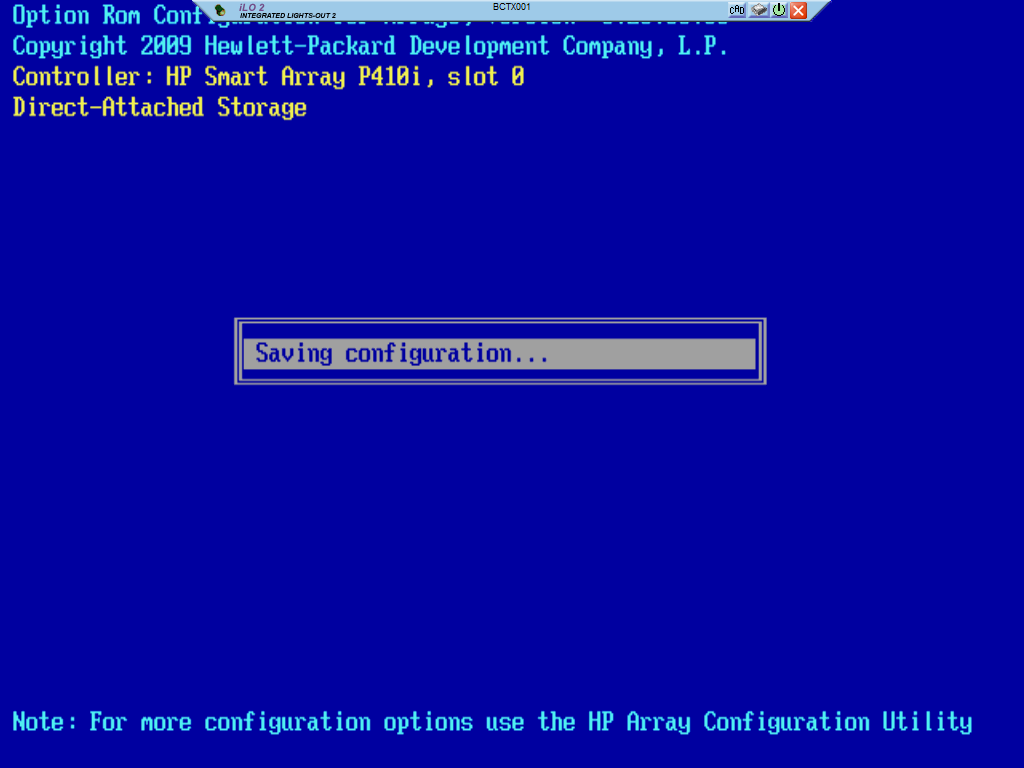
After a reset the Smart Array Controller (P410) halted a very long time on Initializing and eventually failed.
I retried the whole procedure with the same result but this time the controller reported: “previous lockup code 0xAB”.
My next step would be a firmware update and this kb article from HP confirms that it was indeed a firmware issue: HP Serial Smart Array Controllers P410/411/212/712m/410i – May Hang with Lockup Error Code 0XAB Configured in Zero Memory Mode.
This kb article also tells me why I didn’t have this error on another blade: that one had the Battery Backed Write Cache module.
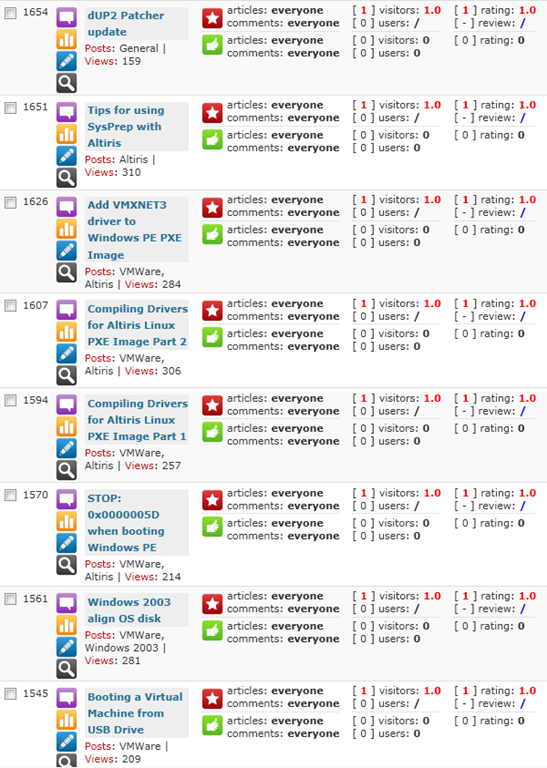
On my blog I offer visitors the options to rate the articles I write using either thumbs up/down or a 1-10 star rating.
I am interested in what content my readers like so these ratings (and of course comments you leave) indicate what kind of articles you like and which you don’t.
However some people feel the need to abuse this, take a look at this:
Profile



Top Posts
- Query Active Directory from Excel
- RNS 510 Startup Logo–My thoughts
- Adding a hidden Exchange mailbox to Outlook
- How rdp passwords are encrypted
- Get Actual CPU Clock Speed with PowerShell
- ClickOnce Applications in Enterprise Environments
- VW RNS 510 Navigation Startup Pictures
- Unattended Installation of IBM System i Access for Windows
- Reading physical memory size from the registry
- Show Client IP Address when using NetScaler as a Reverse Proxy
Recent Comments
Featured Downloads
- AClientFix (13595 downloads )
- AddPrinter2.zip (12854 downloads )
- AdProps (12379 downloads )
- AdSample1 (11432 downloads )
- AMD Radeon Crimson ReLive (29807 downloads )
- Atheros Driver (34019 downloads )
- AutoLogonXP 1.0 (11404 downloads )
- CDZA (9560 downloads )
- ChDrvLetter.zip (11217 downloads )
- ChDrvLetter.zip (14356 downloads )
Blogroll
- Andrew Morgan
- Arnout’s blog
- Assa’s Blog
- Barry Schiffer
- Delphi Praxis
- Ingmar Verheij
- Jedi Api Blog
- Jedi API Library
- Jeroen Tielen
- Kees Baggerman
Categories
- .NET (4)
- Active Directory (28)
- Altiris (36)
- App-V (1)
- Apple (5)
- Application Compatibility (11)
- Automotive (5)
- AWS (1)
- BootCamp (1)
- C# (6)
- C++ (2)
- Citrix (87)
- Delphi (61)
- Embedded (4)
- Exchange (16)
- General (71)
- iPhone (5)
- Java (8)
- Linux (1)
- Lync (2)
- NetScaler (1)
- Oracle (4)
- Other (1)
- Packaging (19)
- PowerShell (56)
- Programming (79)
- Quest (1)
- RES (7)
- script (22)
- ShareFile (1)
- SQL Server (10)
- Strange Error (3)
- Terminal Server (68)
- ThinApp (3)
- ThinKiosk (1)
- Ubuntu (1)
- Unattended Installation (19)
- Uncategorized (51)
- UWP (2)
- Vista (37)
- Visual Studio (1)
- VMWare (26)
- Windows 10 (2)
- Windows 2003 (30)
- Windows 2008 (37)
- Windows 2008 R2 (16)
- Windows 2012 (2)
- Windows 7 (30)
- Windows 8 (4)
- Windows Internals (12)
- Windows XP (16)
Archives
- February 2023 (1)
- October 2022 (3)
- July 2022 (1)
- June 2022 (2)
- October 2019 (1)
- March 2018 (1)
- January 2018 (4)
- December 2017 (3)
- April 2017 (1)
- March 2017 (5)
- February 2017 (4)
- May 2016 (3)
- March 2016 (1)
- October 2015 (2)
- September 2015 (1)
- January 2015 (1)
- August 2014 (1)
- July 2014 (8)
- May 2014 (1)
- November 2013 (1)
- October 2013 (2)
- September 2013 (3)
- August 2013 (4)
- June 2013 (2)
- May 2013 (3)
- April 2013 (5)
- March 2013 (5)
- February 2013 (1)
- January 2013 (5)
- December 2012 (9)
- November 2012 (3)
- October 2012 (3)
- August 2012 (4)
- July 2012 (2)
- June 2012 (1)
- May 2012 (6)
- March 2012 (13)
- February 2012 (12)
- January 2012 (9)
- December 2011 (9)
- November 2011 (4)
- October 2011 (5)
- September 2011 (10)
- August 2011 (10)
- July 2011 (2)
- June 2011 (8)
- May 2011 (12)
- April 2011 (4)
- March 2011 (14)
- February 2011 (8)
- January 2011 (32)
- December 2010 (23)
- November 2010 (19)
- October 2010 (10)
- September 2010 (6)
- August 2010 (1)
- July 2010 (1)
- June 2010 (6)
- March 2010 (7)
- February 2010 (3)
- December 2009 (3)
- November 2009 (11)
- September 2009 (2)
- July 2009 (1)
- June 2009 (5)
- May 2009 (1)
- April 2009 (2)
- March 2009 (3)
- February 2009 (6)
- January 2009 (3)
- December 2008 (8)
- November 2008 (5)
- October 2008 (3)
- September 2008 (3)
- August 2008 (3)
- June 2008 (6)
- May 2008 (2)
- April 2008 (3)
- March 2008 (5)
- January 2008 (3)
- December 2007 (3)
- November 2007 (13)
- October 2007 (10)