Remko Weijnen's Blog (Remko's Blog)
About Virtualization, VDI, SBC, Application Compatibility and anything else I feel like
1,655 views
This means you are installing the wrong edition, eg x86 version on an x64 OS.
All available version are listed on the MSDN Visual J# Redistributable Packages page.
A while ago I created a script that I can run as embedded script in Altiris that creates a Server Manager Answer File (for Server 2008).
I could have simply done an echo >answer.xml but I wanted a well formed XML that could be read and displayed in an XML editor or Internet Explorer when needed.
I use the Microsoft.XMLDom object in the script the create the XML and I think the code is easy to understand so I will just show it here: Read the rest of this entry »
I did an unattended install of Java Jre1.6_0.22 using an mst file that puts all (auto)update properties to off.
However it seems that Java simply ignores this, so usually a script runs after the install to the delete some registry keys and perform some extra configuration.
With more recent Java versions it’s easier to simply uninstall the update component with the following commandline:
msiexec /x {4A03706F-666A-4037-7777-5F2748764D10} /qb-
I was playing around with the AxSched tool that comes with Altiris, in my case the version that comes with v6.9 build 453.
I could not make it connect to the Deployment Server from my test machine, it seemed like the /dsn parameter I used was totally ignored.
I also tried the /d and /db parameters but they didn’t have any effect at all, the message was always:
Error opening database connection:
SQL Server does not exist or access denied.
ConnectionOpen (Connect()).
So I opened AxSched in Ida Pro and set a Breakpoint to the place where the SQL Connection seems to be made:
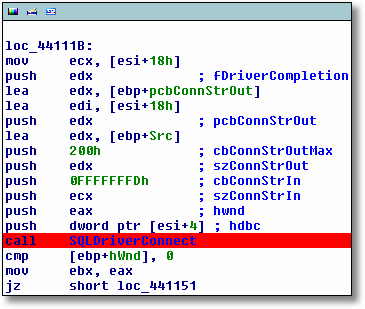
Ida nicely hints us that the ConnectionString is in the ECX register so we only have to inspect it to see it’s value.
Actually AxSched does several attemps and the used Connection Strings are:
- DRIVER={SQL Server};DSN=;SERVER=;Trusted_Connection=yes;
- DRIVER={SQL Server};DSN=;SERVER=;UID=sa;PWD=;Trusted_Connection=no;
- DSN=Altiris eXpress Database;
- DSN=Altiris eXpress Database;Trusted_Connection=yes;
- DSN=Altiris eXpress Database;UID=sa;PWD=;Trusted_Connection=no;
So I bypassed by adding a DSN with the name Altiris eXpress Database and then it works.
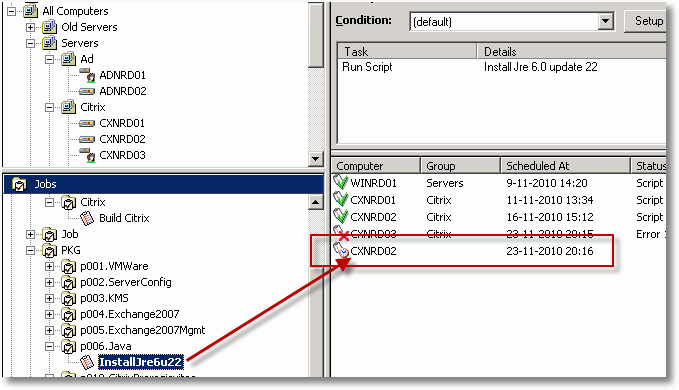
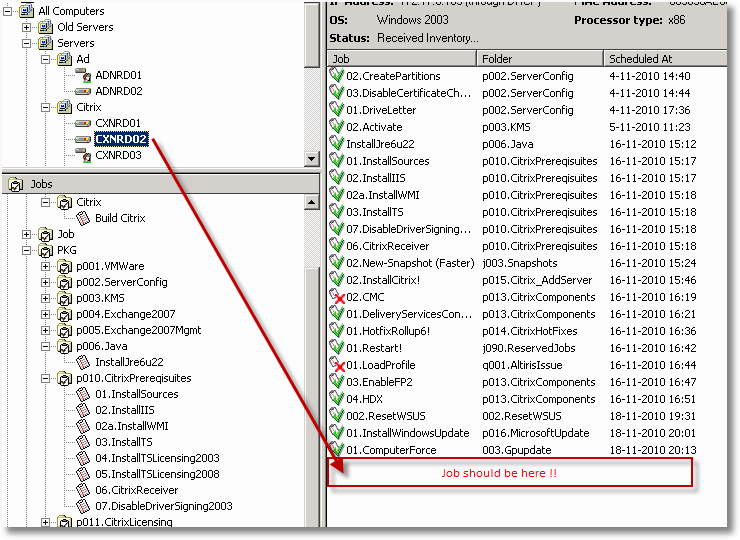
Earlier today I wrote about my Altiris Job Builder tool but when I tested the actual produced build job I noticed something weird: the job was scheduled but not executed.
I then tried to manually push a job to this server and that one executed fine.
When I clicked the Job I could see that it was scheduled:
But when I clicked the Server it wasn’t there:
I have created a little tool for myself that I have call Altiris Job Builder, it retreives the Jobs from the Altiris database and shows them in a Treeview.
Then I can assemble a Master Build Job by dragging the needed Jobs to another Treeview on the right. Since it’s just for me it doesn’t have a fancy gui:

So why did I write it? Well I have divided my Jobs into Prerequisites and Packages, for instance IIS and Terminal Server and Java are prereqisuites for Citrix. But many prereqisuites are required for one or more other packages, eg Java is also used for certain applications. Read the rest of this entry »
If you have ever installed Citrix Presentation Server/XenApp or one of the management consoles then you have probably dealt with Java versions.
Citrix is very picky about the Java version so it’s usually best to initially install the Jre version that is delivered with the product.
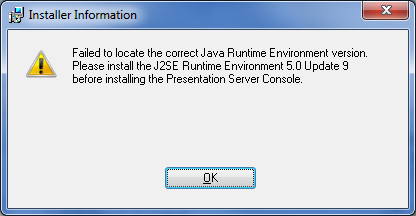
In my case however I needed to install the CMC for Xenapp 5 on Windows 2003, it requires JRE 5.0 Update 9 but this version was undesirable.
So I tried to install the CMC with the current JRE version (1.6.0_22 at this time) but it makes the Installer exit immediately:
I ran a VBScript that queries the Win32_Product WMI class on Windows 2003 but it returned error 0x80041010 instead of the expected results.
I looked up that errorcode and it means WBEM_E_INVALID_CLASS. This happened because the “WMI Windows Installer Provider” was not installed.
You can do this through Add/Remove Programs | Windows Components | Management and Monitoring Tools | WMI Windows Installer Provider.
Or if you want to do this with a script you can use SysocMgr:
1 2 3 4 5 6 7 8 | @echo off rem Install WMI Windows Installer Provider rem Create Sysoc Answer File echo [Components] > InstallIWMI.txt echo WbemMSI = on >> InstallIWMI.txt Sysocmgr.exe /i:\windows\inf\sysoc.inf /u:\Windows\Temp\InstallIWMI.txt /r |
When installing the Citrix Delivery Services Console with an unattended install (using CtxInstall.exe) the Citrix Password Manager gets automatically installed as well.
You can see this in the Console where you will get an additional node called “Single Sign On”.
I couldn’t find any information on how to make CtxInstall exclude it so I was left with 2 options:
- Unregistering the .net assembly for the Single Sign On Node.
- Unattended Uninstall of the Password Manager.
I went for option 2 since 1 might mean it comes back after an update, the commandline is:
msiexec /x {25F2D5CD-B428-4869-B32B-031A9D5CE0C1} /Qb
If it’s somehow possible to prevent installing it in the frist place, please let me know!
After having successfully tested the Unattended install jobs for my Citrix XenApp 5 environment I went on to testing the install.
The install itsself and the msi logs that my jobs created all indicated that the install was successfull.
So I went on and launched the install jop for the Delivery Services Console. This job succeeded nicely but when I opened the console the XenApp node was missing:
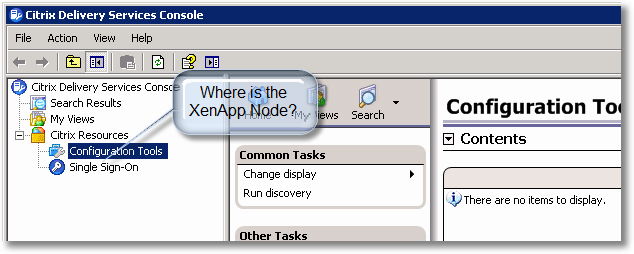
The resolution is described in CTX125827 but Resolution 2 is a lot of manual labour 🙁
So what do we do? We script it! Read the rest of this entry »
Profile



Top Posts
- Query Active Directory from Excel
- RNS 510 Startup Logo–My thoughts
- Adding a hidden Exchange mailbox to Outlook
- How rdp passwords are encrypted
- Get Actual CPU Clock Speed with PowerShell
- ClickOnce Applications in Enterprise Environments
- VW RNS 510 Navigation Startup Pictures
- Unattended Installation of IBM System i Access for Windows
- Reading physical memory size from the registry
- Show Client IP Address when using NetScaler as a Reverse Proxy
Recent Comments
Featured Downloads
- AClientFix (13595 downloads )
- AddPrinter2.zip (12854 downloads )
- AdProps (12379 downloads )
- AdSample1 (11432 downloads )
- AMD Radeon Crimson ReLive (25796 downloads )
- Atheros Driver (34019 downloads )
- AutoLogonXP 1.0 (11404 downloads )
- CDZA (9560 downloads )
- ChDrvLetter.zip (11217 downloads )
- ChDrvLetter.zip (14356 downloads )
Blogroll
- Andrew Morgan
- Arnout’s blog
- Assa’s Blog
- Barry Schiffer
- Delphi Praxis
- Ingmar Verheij
- Jedi Api Blog
- Jedi API Library
- Jeroen Tielen
- Kees Baggerman
Categories
- .NET (4)
- Active Directory (28)
- Altiris (36)
- App-V (1)
- Apple (5)
- Application Compatibility (11)
- Automotive (5)
- AWS (1)
- BootCamp (1)
- C# (6)
- C++ (2)
- Citrix (87)
- Delphi (61)
- Embedded (4)
- Exchange (16)
- General (71)
- iPhone (5)
- Java (8)
- Linux (1)
- Lync (2)
- NetScaler (1)
- Oracle (4)
- Other (1)
- Packaging (19)
- PowerShell (56)
- Programming (79)
- Quest (1)
- RES (7)
- script (22)
- ShareFile (1)
- SQL Server (10)
- Strange Error (3)
- Terminal Server (68)
- ThinApp (3)
- ThinKiosk (1)
- Ubuntu (1)
- Unattended Installation (19)
- Uncategorized (51)
- UWP (2)
- Vista (37)
- Visual Studio (1)
- VMWare (26)
- Windows 10 (2)
- Windows 2003 (30)
- Windows 2008 (37)
- Windows 2008 R2 (16)
- Windows 2012 (2)
- Windows 7 (30)
- Windows 8 (4)
- Windows Internals (12)
- Windows XP (16)
Archives
- February 2023 (1)
- October 2022 (3)
- July 2022 (1)
- June 2022 (2)
- October 2019 (1)
- March 2018 (1)
- January 2018 (4)
- December 2017 (3)
- April 2017 (1)
- March 2017 (5)
- February 2017 (4)
- May 2016 (3)
- March 2016 (1)
- October 2015 (2)
- September 2015 (1)
- January 2015 (1)
- August 2014 (1)
- July 2014 (8)
- May 2014 (1)
- November 2013 (1)
- October 2013 (2)
- September 2013 (3)
- August 2013 (4)
- June 2013 (2)
- May 2013 (3)
- April 2013 (5)
- March 2013 (5)
- February 2013 (1)
- January 2013 (5)
- December 2012 (9)
- November 2012 (3)
- October 2012 (3)
- August 2012 (4)
- July 2012 (2)
- June 2012 (1)
- May 2012 (6)
- March 2012 (13)
- February 2012 (12)
- January 2012 (9)
- December 2011 (9)
- November 2011 (4)
- October 2011 (5)
- September 2011 (10)
- August 2011 (10)
- July 2011 (2)
- June 2011 (8)
- May 2011 (12)
- April 2011 (4)
- March 2011 (14)
- February 2011 (8)
- January 2011 (32)
- December 2010 (23)
- November 2010 (19)
- October 2010 (10)
- September 2010 (6)
- August 2010 (1)
- July 2010 (1)
- June 2010 (6)
- March 2010 (7)
- February 2010 (3)
- December 2009 (3)
- November 2009 (11)
- September 2009 (2)
- July 2009 (1)
- June 2009 (5)
- May 2009 (1)
- April 2009 (2)
- March 2009 (3)
- February 2009 (6)
- January 2009 (3)
- December 2008 (8)
- November 2008 (5)
- October 2008 (3)
- September 2008 (3)
- August 2008 (3)
- June 2008 (6)
- May 2008 (2)
- April 2008 (3)
- March 2008 (5)
- January 2008 (3)
- December 2007 (3)
- November 2007 (13)
- October 2007 (10)