Remko Weijnen's Blog (Remko's Blog)
About Virtualization, VDI, SBC, Application Compatibility and anything else I feel like
344 views
non-existent schema type ‘Snmp!System.SnmpVarBindsSchema’ error in SCOM
Author: Remko Weijnen13 Jul
 Today I encounterd what seems to be a bug in the System Center 2012 Visual Studio Authoring Extensions. I wanted to define a Performance Collection Rule that reads out the percentage of free memory from an SNMP device.
Since the device returns only the percentage of used memory I needed to use the ComputedPerfProvider provider to substract the used memory percentage from 100.
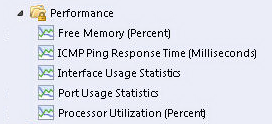
I could of course report used memory instead of free memory but I wanted the resulst to appear in the default SCOM Performance View, which only lists Free Memory:
 I am currently working on a Management Pack for SCOM and I have studies a few examples on adding processor and memory counters.
These examples all reference a Management Pack named "System.NetworkManagement.Monitoring.mp" but this Management Pack is not bundled with the System Center 2012 Visual Studio Authoring Extensions.
Error MSB4018 when building a Management Pack with Visual Studio Authoring Extensions
Author: Remko Weijnen8 Jul
I am currently working on a Management Pack for System Center Operations Manager (aka SCOM). I am using the System Center 2012 Visual Studio Authoring Extensions and during build of my project I suddenly got the following error: “MSB4018: The “MergeFragments” task failed unexpectedly“:

I searched on this error message but wasn’t able to find anything helpful. In order to get more detailed output from MSBuild I changed the MSBuild project build output verbosity. To do this go to the Tools menu in Visual Studio and select Options. Navigate to the “Build and Run” node under “Projects and Solutions” and set both options to “Diagnostic”:

Aaron Parker was talking about the uninstall guid in his session “Hands off my Golden Image Redux” at Citrix Synergy.
I remembered that I had written a small PowerShell script to read out the uninstall GUID from an MSI file. This way you do not need to actually install the software to determine the uninstall GUID.
How does that work?
There is a logical relation between the MSI Product Code property and the install guid. In this example I’ve taken install_flash_player_11.8.800.174_active_x.msi as an example.
The Uninstall key is HKLM\SOFTWARE\Microsoft\Windows\CurrentVersion\Installer\UserData\S-1-5-18\Products\A2E504D3D31C0D5409F28F3FDD565AD9
The interesting part of it is the GUID:
A2E504D3D31C0D5409F28F3FDD565AD9
If we look into the MSI properties with (Super)Orca we see:

If we compare those GUIDS:
Uninstal {A2E504D3-D31C-0D54-09F2-8F3FDD565AD9}
Product Code{3D405E2A-C13D-45D0-902F-F8F3DD65A59D}
We can see that we need to apply the following logic:
· First 8 bytes must be swapped right to left
· Next 4 bytes (skipping the hyphen) also swapped right to left
· Next 4 bytes (skipping the hyphen) also swapped right to left
· Next 4 bytes (skipping the hyphen) also swapped right to left
· Last 12 bytes must be byte swapped per byte (F8 -> 8F, F3 -> 3F etc).
Knowing that we can make life easier with PowerShell:
[posh]function Get-Property ($Object, $PropertyName, [object[]]$ArgumentList)
{
return $Object.GetType().InvokeMember($PropertyName, ‘Public, Instance, GetProperty’, $null, $Object, $ArgumentList)
}
function Invoke-Method ($Object, $MethodName, $ArgumentList)
{
return $Object.GetType().InvokeMember($MethodName, ‘Public, Instance, InvokeMethod’, $null, $Object, $ArgumentList)
}
function GetMsiProductCode([string]$path)
{
$msiOpenDatabaseModeReadOnly = 0
$Installer = New-Object -ComObject WindowsInstaller.Installer
$Database = Invoke-Method $Installer OpenDatabase @($path, $msiOpenDatabaseModeReadOnly)
$View = Invoke-Method $Database OpenView @(“SELECT Value FROM Property WHERE Property=’ProductCode'”)
Invoke-Method $View Execute | Out-Null
$Record = Invoke-Method $View Fetch
if ($Record)
{
Write-Output (Get-Property $Record StringData 1)
}
}
cls
$path = “c:\Users\rweijnen\Desktop\install_flash_player_11.8.800.174_active_x.msi”
$item = “” | Select-Object Path, ProductCode, UninstallGuid, UninstallRegistry
$item.Path = $path
$item.ProductCode = (GetMsiProductCode $item.Path)
$DestGuid = ([regex]::Matches($item.ProductCode.Substring(1,8),’.’,’RightToLeft’) | ForEach {$_.value}) -join ”
$DestGuid += ([regex]::Matches($item.ProductCode.Substring(10,4),’.’,’RightToLeft’) | ForEach {$_.value}) -join ”
$DestGuid += ([regex]::Matches($item.ProductCode.Substring(15,4),’.’,’RightToLeft’) | ForEach {$_.value}) -join ”
$DestGuid += ([regex]::Matches($item.ProductCode.Substring(20,2),’.’,’RightToLeft’) | ForEach {$_.value}) -join ”
$DestGuid += ([regex]::Matches($item.ProductCode.Substring(22,2),’.’,’RightToLeft’) | ForEach {$_.value}) -join ”
for ($i=25 ; $i -lt 37 ; $i = $i + 2)
{
$DestGuid += ([regex]::Matches($item.ProductCode.Substring($i,2),’.’,’RightToLeft’) | ForEach {$_.value}) -join ”
}
$item.UninstallGuid = “{” + ([Guid]$DestGuid).ToString().ToUpper() + “}”
$item.UninstallRegistry = “HKLM\SOFTWARE\Microsoft\Windows\CurrentVersion\Installer\UserData\S-1-5-18\Products\{0}” -f $DestGuid
$item | Format-List
Sample output:
Path : c:\Users\rweijnen\Desktop\install_flash_player_11.8.800.174_active_x.msi
ProductCode : {3D405E2A-C13D-45D0-902F-F8F3DD65A59D}
UninstallGuid : {A2E504D3-D31C-0D54-09F2-8F3FDD565AD9}
UninstallRegistry : HKLM\SOFTWARE\Microsoft\Windows\CurrentVersion\Installer\UserData\S-1-5-18\Products\A2E504D3D31C0D5409F28F3FDD565AD9
[/posh]
 Benjamin Delpy the author of the well known mimikatz toolkit has released a very cool extension to WinDbg today.
In summary the extension can extract Windows passwords from memory dumps, hibernation files and Virtual Machine .vmem files (paging, snapshots).
Especially the ability to extract passwords from .vmem files was very interesting. So I decided to to test this out, so let’s see how it works!
 I will be presenting a session at E2EVC in Rome next weekend.
Recently I published an article on my blog that shows how to run an executable of choice when the Citrix Receiver exits.
 In this session I will show you how to find such undocumented features in applications step by step. Using this example we will open the Citrix Receiver in Ida Pro and disassemble it.
Using public resources such as the Citrix Public Symbol Server we can analyze, understand and finally make the code more readable.
I will try to make this session not an “enter the matrix one” but one that could be considered as an intro into using Ida Pro for reverse engineering and app compat fixing.
Hope to see you all in Rome, my session is scheduled Friday November 1 from 18.30 – 19.15. There will be room for questions so feel free to take your own Crapplication™ and ask about it after the session.
See you in Rome!
I wanted to do an unattended install of the Microsoft App-V 5.0 SP1 client.
I wanted to install using the MSI’s instead of using the exe installer so I unpacked the MSI’s from the installer as documented here.
The install failed however with MSI error 1603. I activated logging but that was not very helpful since it only logged "MainEngineThread is returning 1603".
Manual install of the MSI gave a bettor error message:
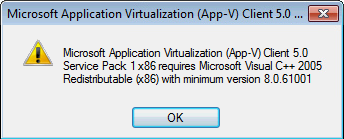
I had already installed the MSVC++ 2005 SP1 runtime but the version was slightly lower.
Unfortunately Microsoft doesn’t publish the build numbers with their downloads so it takes some searching to determine the correct download.
Version 8.0.61001 is labeled as "Microsoft Visual C++ 2005 Service Pack 1 Redistributable Package MFC Security Update" and can be downloaded here.
There is a similar requirement for the Microsoft Visual C++ 2010 runtime which should be at least 10.0.40219. This one is easier though because the required version is extracted together with the MSI files.
As a final note you need to set the AcceptEULA MSI property to 1 for both the client and language pack MSI or the install will fail.
I wanted to run a virtual Citrix License server in my LAB.
Unfortunately Citrix only provides the VPX License Server in XenServer format (.xva). If you want to run the VPX on VMware ESX or Microsoft Hyper-V you need to convert it first.
The option to convert a Xen Virtual Appliance to OVF format was removed in XenConvert 2.4.1. So for a conversion you need version 2.3.1.
Here are the direct download links:
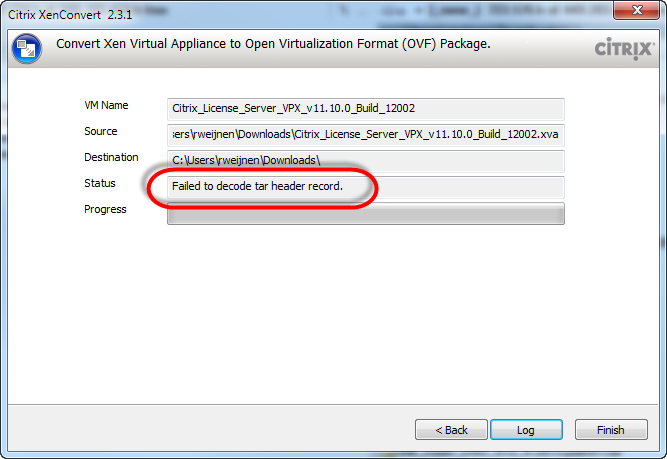
However when I tried to convert the downloaded VPX (Citrix_License_Server_VPX_v11.10.0_Build_12002.xva) I got the error "Failed to decode tar header record":
A while ago I was doing some research for Magic Filter when I stumbled upon something interesting within Receiver.
Inside wfica32.exe is a function called _Eng_RunExecutableOnExit. That name caught my interest, I’ve made it a little more readable with Ida Pro:
The publisher could not be verified when launching an application with RES Workspace Manager
Author: Remko Weijnen13 Sep
Today I was troubleshooting a warning message that popped up when launching a network application with RES Workspace Manager:
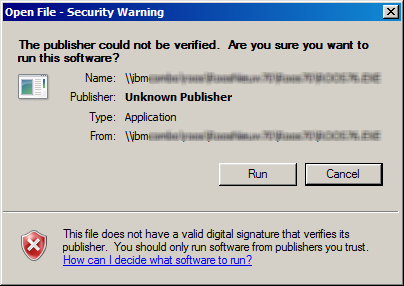
Usually this is a simple fix: add the servername (file://server) to the Local Intranet zone:
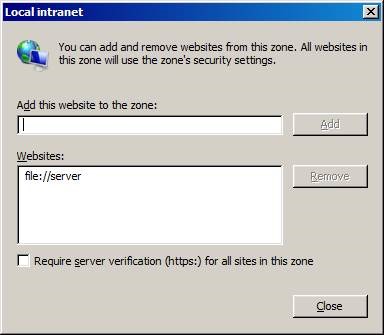
That worked when I launched the application directly. However when launching the application with RES Workspace Manager I would still get the warning. Even stranger: when I clicked Cancel the application would still be launched.
Profile



Top Posts
- Query Active Directory from Excel
- RNS 510 Startup Logo–My thoughts
- Adding a hidden Exchange mailbox to Outlook
- How rdp passwords are encrypted
- Get Actual CPU Clock Speed with PowerShell
- ClickOnce Applications in Enterprise Environments
- VW RNS 510 Navigation Startup Pictures
- Unattended Installation of IBM System i Access for Windows
- Reading physical memory size from the registry
- Show Client IP Address when using NetScaler as a Reverse Proxy
Recent Comments
Featured Downloads
- AClientFix (13595 downloads )
- AddPrinter2.zip (12854 downloads )
- AdProps (12379 downloads )
- AdSample1 (11432 downloads )
- AMD Radeon Crimson ReLive (28299 downloads )
- Atheros Driver (34019 downloads )
- AutoLogonXP 1.0 (11404 downloads )
- CDZA (9560 downloads )
- ChDrvLetter.zip (11217 downloads )
- ChDrvLetter.zip (14356 downloads )
Blogroll
- Andrew Morgan
- Arnout’s blog
- Assa’s Blog
- Barry Schiffer
- Delphi Praxis
- Ingmar Verheij
- Jedi Api Blog
- Jedi API Library
- Jeroen Tielen
- Kees Baggerman
Categories
- .NET (4)
- Active Directory (28)
- Altiris (36)
- App-V (1)
- Apple (5)
- Application Compatibility (11)
- Automotive (5)
- AWS (1)
- BootCamp (1)
- C# (6)
- C++ (2)
- Citrix (87)
- Delphi (61)
- Embedded (4)
- Exchange (16)
- General (71)
- iPhone (5)
- Java (8)
- Linux (1)
- Lync (2)
- NetScaler (1)
- Oracle (4)
- Other (1)
- Packaging (19)
- PowerShell (56)
- Programming (79)
- Quest (1)
- RES (7)
- script (22)
- ShareFile (1)
- SQL Server (10)
- Strange Error (3)
- Terminal Server (68)
- ThinApp (3)
- ThinKiosk (1)
- Ubuntu (1)
- Unattended Installation (19)
- Uncategorized (51)
- UWP (2)
- Vista (37)
- Visual Studio (1)
- VMWare (26)
- Windows 10 (2)
- Windows 2003 (30)
- Windows 2008 (37)
- Windows 2008 R2 (16)
- Windows 2012 (2)
- Windows 7 (30)
- Windows 8 (4)
- Windows Internals (12)
- Windows XP (16)
Archives
- February 2023 (1)
- October 2022 (3)
- July 2022 (1)
- June 2022 (2)
- October 2019 (1)
- March 2018 (1)
- January 2018 (4)
- December 2017 (3)
- April 2017 (1)
- March 2017 (5)
- February 2017 (4)
- May 2016 (3)
- March 2016 (1)
- October 2015 (2)
- September 2015 (1)
- January 2015 (1)
- August 2014 (1)
- July 2014 (8)
- May 2014 (1)
- November 2013 (1)
- October 2013 (2)
- September 2013 (3)
- August 2013 (4)
- June 2013 (2)
- May 2013 (3)
- April 2013 (5)
- March 2013 (5)
- February 2013 (1)
- January 2013 (5)
- December 2012 (9)
- November 2012 (3)
- October 2012 (3)
- August 2012 (4)
- July 2012 (2)
- June 2012 (1)
- May 2012 (6)
- March 2012 (13)
- February 2012 (12)
- January 2012 (9)
- December 2011 (9)
- November 2011 (4)
- October 2011 (5)
- September 2011 (10)
- August 2011 (10)
- July 2011 (2)
- June 2011 (8)
- May 2011 (12)
- April 2011 (4)
- March 2011 (14)
- February 2011 (8)
- January 2011 (32)
- December 2010 (23)
- November 2010 (19)
- October 2010 (10)
- September 2010 (6)
- August 2010 (1)
- July 2010 (1)
- June 2010 (6)
- March 2010 (7)
- February 2010 (3)
- December 2009 (3)
- November 2009 (11)
- September 2009 (2)
- July 2009 (1)
- June 2009 (5)
- May 2009 (1)
- April 2009 (2)
- March 2009 (3)
- February 2009 (6)
- January 2009 (3)
- December 2008 (8)
- November 2008 (5)
- October 2008 (3)
- September 2008 (3)
- August 2008 (3)
- June 2008 (6)
- May 2008 (2)
- April 2008 (3)
- March 2008 (5)
- January 2008 (3)
- December 2007 (3)
- November 2007 (13)
- October 2007 (10)