Remko Weijnen's Blog (Remko's Blog)
About Virtualization, VDI, SBC, Application Compatibility and anything else I feel like
Archive for the ‘Citrix’ Category
Redirect Registry by Modifying .NET Executable
Author: Remko Weijnen30 May
Yesterday I was troubleshooting an application that was migrated to Citrix XenApp.
The application is able to use a high precision scale which is attached to the client pc’s com port. This com port is redirected to XenApp.
While testing users reported several issues, let’s have a look at them.
Error configuring COM Port
Within the application the comport to which the scale is connected must be configured:
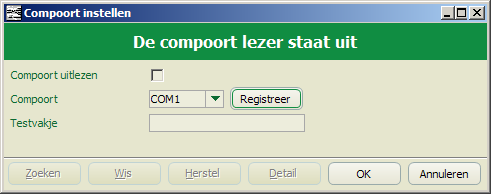
After pressing "Registreer" to register the new com port the following error message was shown

Application Compatibility Fixing to the Extreme?
Author: Remko Weijnen23 May
Today’s blog is about an application that was migrated to Citrix XenApp. During testing the users reported that several application menu’s were missing.
An example is the settings menu where the System tab is missing:
| Fat Client: | XenApp: |
![clip_image002[5]](https://www.remkoweijnen.nl/blog/wp-content/uploads/2013/05/clip_image0025.jpg "clip_image002[5]") |  |
I suspected a permissions issue so I added the account to the Local Administrator group to verify that. And indeed the System tab was visible.
Process Monitor
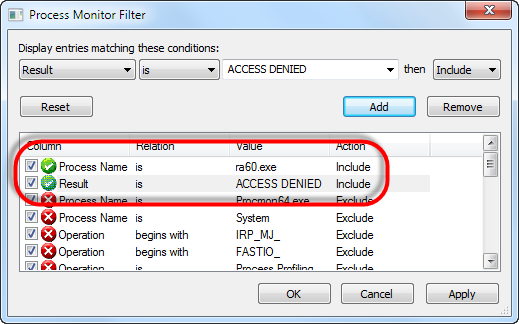
I removed the account from the Administrators group and fired up Process Monitor. I set a filter on the process name (ra60.exe) and on Result (ACCESS DENIED):
Scriptable Citrix Password Encoder
Author: Remko Weijnen19 Mar
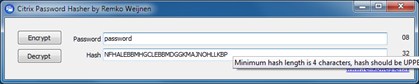
A while ago I published a tool to Encode and Decode Citrix passwords. Today I am publishing a small update to this tool that makes it scriptable by adding a COM interface.
If you start the tool without parameters you will get the GUI, just like before:
To use the COM interface you first need to register the executable with the /regserver switch:

After the registration you can call it using any language that supports COM. To get you started I wrote a few examples
The case of the COM Port Redirection
Author: Remko Weijnen11 Mar
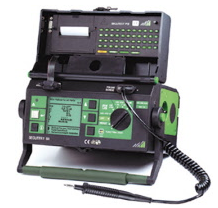 One of my colleagues asked me to assist in troubleshooting an application called SmartWare FM running on Citrix XenApp.
This application reads data from an external device called SECUTEST.
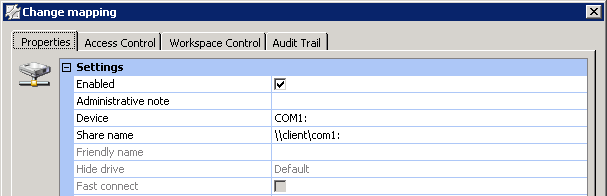
The device is connected to a COM port which is redirected to the XenApp session. In contrast to Microsoft Remote Desktop Services COM ports are not automatically redirected in XenApp but need to be mapped via eg a logonscript (NET USE COM1: \\Client\COM1:) or using UEM.
In my case the COM port was mapped with RES Workspace Manager:
The case of the missing audio
Author: Remko Weijnen25 Jan
Yesterday I was asked to investigate a problem with a presentation pc. Even though the volume was set maximal there was not audio output.
The machine was used to connect to a Citrix XenApp desktop and RES Workspace Extender was used to integrate local applications in the XenApp desktop.
The local sound volume control was published as a subscribed application so I launched that and verified that the volume was set to Maximum:

I decided to launch the local explorer shell and noticed that there were two volume control icons in the Traybar:

Return username instead of computername in a ThinApp
Author: Remko Weijnen15 Jan
 One of the lesser known features of VMware ThinApp is that you can supply a Virtual Computer name.
This is documented as follows in the package.ini reference guide:
VirtualComputerName Parameter
The VirtualComputerName parameter determines whether to rename the computer name, to avoid naming conflicts between the capture process and the deployment process.
License Check fails on Citrix XenApp
Author: Remko Weijnen7 Dec
 Today I was asked to assist in getting an Excel Add-In to work on Citrix XenApp.
The application was packaged into a Thinapp by one of our package engineers.
However when testing the Add-In on Citrix XenApp the following message appeared:
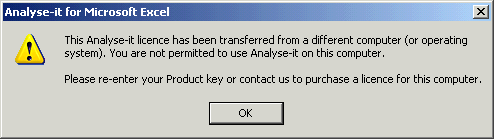
Apparently this application does a license check that fails when run from another server (how bad).
Disclaimer
Before we go on: I would like to make clear that my goal is not to be able to use an application without license. I am just trying to make it work within the customer’s environment.
Application Hangs when Scanning in Citrix XenApp
Author: Remko Weijnen6 Dec
Another interesting issue today with an application that runs on Citrix XenApp.
Environment
Customer has a Citrix XenApp 5 environment running on Windows Server 2003. Clients are all Windows XP and run the Citrix Online Plugin 12.3 full screen.
RES Workspace Extender is used to integrate locally installed application into the XenApp Session. Users have no access to the local desktop.
Symptoms
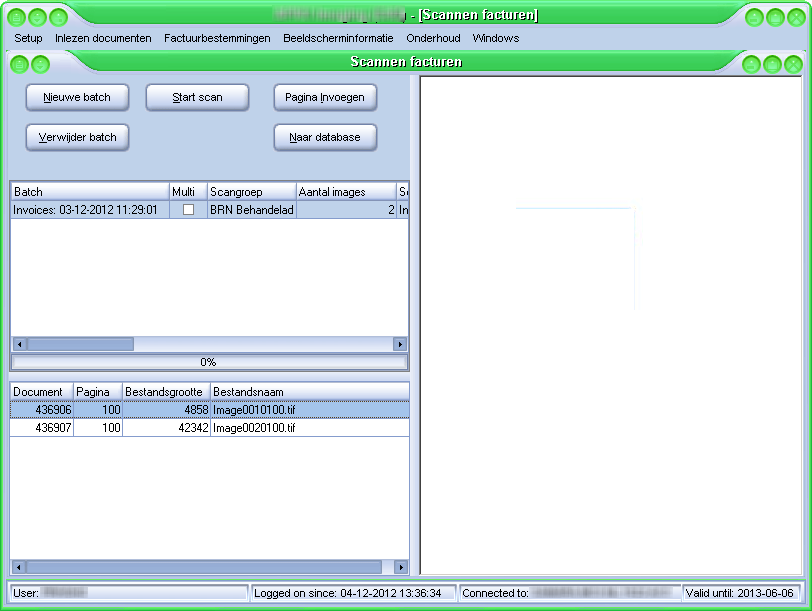
This particular application scans invoices using a USB scanner attached to the client and runs them trough a workflow.
Whenever the Start scan button was pressed the application froze.
Return username instead of computername to Applications
Author: Remko Weijnen6 Dec
 Some applications use the computer’s name as a unique identifier, rather than using the user name. In a single-user-per-computer environment, this strategy works well.
However, in a Multi User environment such as Citrix XenApp or Microsoft’s Remote Desktop Services (Terminal Server), all connected users report the same computername.
If the application relies on unique computernames to handle tasks such as file and record locking, then the application will fail.
 We can however set an Application Compatibility Flag in the registry to return the username instead of the computername.
To demonstrate this behaviour I wrote a small Test Application called TestAppCompatFlags.exe.
File not found error when scanning using Twain Redirection in Citrix XenApp
Author: Remko Weijnen4 Dec
 Scanners attached to client machines can be used from within a Citrix XenApp session via a mechanism called Twain Redirection.
For this mechanism to work correctly the file twain_32.dll must be present in the Windows directory.
On Windows 2008 this dll should be copied from winsxs (side by side) to the windows directory as described in CTX123981.
On Windows 2003 the dll is already in the correct directory, however applications that are not Terminal Server Aware cannot find this dll because the Windows directory is redirected to the user profile. Citrix recommends copying twain_32.dll to each user’s profile directory but this will take up unnecessary space.
So what alternatives do we have?
Profile



Top Posts
- Query Active Directory from Excel
- RNS 510 Startup Logo–My thoughts
- Adding a hidden Exchange mailbox to Outlook
- How rdp passwords are encrypted
- Get Actual CPU Clock Speed with PowerShell
- ClickOnce Applications in Enterprise Environments
- VW RNS 510 Navigation Startup Pictures
- Unattended Installation of IBM System i Access for Windows
- Reading physical memory size from the registry
- Show Client IP Address when using NetScaler as a Reverse Proxy
Recent Comments
Featured Downloads
- AClientFix (13595 downloads )
- AddPrinter2.zip (12854 downloads )
- AdProps (12379 downloads )
- AdSample1 (11432 downloads )
- AMD Radeon Crimson ReLive (28206 downloads )
- Atheros Driver (34019 downloads )
- AutoLogonXP 1.0 (11404 downloads )
- CDZA (9560 downloads )
- ChDrvLetter.zip (11217 downloads )
- ChDrvLetter.zip (14356 downloads )
Blogroll
- Andrew Morgan
- Arnout’s blog
- Assa’s Blog
- Barry Schiffer
- Delphi Praxis
- Ingmar Verheij
- Jedi Api Blog
- Jedi API Library
- Jeroen Tielen
- Kees Baggerman
Categories
- .NET (4)
- Active Directory (28)
- Altiris (36)
- App-V (1)
- Apple (5)
- Application Compatibility (11)
- Automotive (5)
- AWS (1)
- BootCamp (1)
- C# (6)
- C++ (2)
- Citrix (87)
- Delphi (61)
- Embedded (4)
- Exchange (16)
- General (71)
- iPhone (5)
- Java (8)
- Linux (1)
- Lync (2)
- NetScaler (1)
- Oracle (4)
- Other (1)
- Packaging (19)
- PowerShell (56)
- Programming (79)
- Quest (1)
- RES (7)
- script (22)
- ShareFile (1)
- SQL Server (10)
- Strange Error (3)
- Terminal Server (68)
- ThinApp (3)
- ThinKiosk (1)
- Ubuntu (1)
- Unattended Installation (19)
- Uncategorized (51)
- UWP (2)
- Vista (37)
- Visual Studio (1)
- VMWare (26)
- Windows 10 (2)
- Windows 2003 (30)
- Windows 2008 (37)
- Windows 2008 R2 (16)
- Windows 2012 (2)
- Windows 7 (30)
- Windows 8 (4)
- Windows Internals (12)
- Windows XP (16)
Archives
- February 2023 (1)
- October 2022 (3)
- July 2022 (1)
- June 2022 (2)
- October 2019 (1)
- March 2018 (1)
- January 2018 (4)
- December 2017 (3)
- April 2017 (1)
- March 2017 (5)
- February 2017 (4)
- May 2016 (3)
- March 2016 (1)
- October 2015 (2)
- September 2015 (1)
- January 2015 (1)
- August 2014 (1)
- July 2014 (8)
- May 2014 (1)
- November 2013 (1)
- October 2013 (2)
- September 2013 (3)
- August 2013 (4)
- June 2013 (2)
- May 2013 (3)
- April 2013 (5)
- March 2013 (5)
- February 2013 (1)
- January 2013 (5)
- December 2012 (9)
- November 2012 (3)
- October 2012 (3)
- August 2012 (4)
- July 2012 (2)
- June 2012 (1)
- May 2012 (6)
- March 2012 (13)
- February 2012 (12)
- January 2012 (9)
- December 2011 (9)
- November 2011 (4)
- October 2011 (5)
- September 2011 (10)
- August 2011 (10)
- July 2011 (2)
- June 2011 (8)
- May 2011 (12)
- April 2011 (4)
- March 2011 (14)
- February 2011 (8)
- January 2011 (32)
- December 2010 (23)
- November 2010 (19)
- October 2010 (10)
- September 2010 (6)
- August 2010 (1)
- July 2010 (1)
- June 2010 (6)
- March 2010 (7)
- February 2010 (3)
- December 2009 (3)
- November 2009 (11)
- September 2009 (2)
- July 2009 (1)
- June 2009 (5)
- May 2009 (1)
- April 2009 (2)
- March 2009 (3)
- February 2009 (6)
- January 2009 (3)
- December 2008 (8)
- November 2008 (5)
- October 2008 (3)
- September 2008 (3)
- August 2008 (3)
- June 2008 (6)
- May 2008 (2)
- April 2008 (3)
- March 2008 (5)
- January 2008 (3)
- December 2007 (3)
- November 2007 (13)
- October 2007 (10)