Remko Weijnen's Blog (Remko's Blog)
About Virtualization, VDI, SBC, Application Compatibility and anything else I feel like
Archive for the ‘PowerShell’ Category
Construct AQS date range with PowerShell
Author: Remko Weijnen4 Nov
 For a script I needed to create an AQS (Advanced Query Syntax) Query that contained a date range.
An example of such is a range is: date:11/05/04..11/10/04
However we need to account for regional settings where for example the data seperator and the order of day and month may be different.
In my example I wanted to match any data that is 30 days or older so let’s do this in PowerShell:
Exchange Move Mailbox Experiences Part 3
Author: Remko Weijnen28 Sep
In Part 2 I showed some details about Mailbox Rule corruptions that can disturb Mailbox Moves.
For this part the topic is Mailbox size, which can be an important factor in deciding which mailboxes you want to move first.
In my case the mailbox size was important because we agreed to move smaller mailboxes during the day but larger mailboxes only outside working hours.
For Exchange 2010 mailboxes it’s very easy to obtain the size using PowerShell.
Example:
1 | Get-Mailbox "rweijnen" | Get-MailboxStatistics | select DisplayName, ItemCount, TotalItemSize |
| DisplayName | ItemCount | TotalItemSize |
| Remko Weijnen | 313 | 34.87 MB (36,564,183 bytes |
But how can we get the Mailbox Size for Exchange 2003 mailboxes?
Inline arrays in PowerShell
Author: Remko Weijnen28 Sep
 Sometimes I want to process a list of “things” easily in PowerShell where the list is not in an external file but in the script itself.
Ideally this list would not be separated by e.g. a comma so it can be easily copy/pasted from external data sources.
Something like this:
1 2 3 4 5 6 | $List = @(" John Doe Jane Doe James Bond And so the list goes on ") |
Settings NTFS Permissions by SID in PowerShell
Author: Remko Weijnen2 Sep
I am currently creating a PowerShell script that creates a user with all needed Active Directory attributes, Exchange mailbox, (TS) Home- and Profile directories and so on.
In such a script you can easily get failures because of Active Directory replication.
Check if a useraccount exists with PowerShell
Author: Remko Weijnen2 Sep
Function below can be used to check if a given Username exists in Active Directory:
1 2 3 4 5 6 7 8 9 10 11 12 13 14 15 | function UserExists([string]$Username) { $strFilter = "(&(objectCategory=person)(sAMAccountName=$Username))" $objDomain = New-Object System.DirectoryServices.DirectoryEntry $objSearcher = New-Object System.DirectoryServices.DirectorySearcher $objSearcher.SearchRoot = $objDomain $objSearcher.PageSize = 1000 $objSearcher.Filter = $strFilter $objSearcher.SearchScope = "Subtree" $colResults = $objSearcher.FindAll() return [bool]($colResults -ne $null) } |
Get smallest Exchange Database in PowerShell
Author: Remko Weijnen16 Aug

I needed to adapt some scripts that create a user with mailbox for Exchange 2010. The existing scripts had a hardcoded database for new mailboxes.
I wanted the mailbox to be created in the smallest database, but how do we determine this?
For Exchange 2010 this is fairly easy using PowerShell:
1 2 3 4 5 6 7 8 9 10 11 12 13 14 15 16 17 18 19 20 21 | # Add Exchange Snapins if ((Get-PSSnapin | where {$_.Name -match "Exchange.Management"}) -eq $null) { Add-PSSnapin Microsoft.Exchange.Management.* } # Get largest possible size $size = [Microsoft.Exchange.Data.ByteQuantifiedSize]::MaxValue.ToBytes() foreach ($db in Get-MailboxDatabase -Status) { # Write-Host "Database:" $db.Name "Size:" $db.DatabaseSize.ToBytes() $db | select ServerName,Name,DatabaseSize # Is the Database smaller than previous smallest size if ( $db.DatabaseSize.ToBytes() -lt $size ) { # This database is smaller, store size and db $size = $db.DatabaseSize.ToBytes() $ExDB = $db } } Write-Host "`nSmallest Database:" $ExDB | select ServerName,Name,DatabaseSize |
Set Exchange Product Key with PowerShell
Author: Remko Weijnen15 Aug
By default Exchange 2007 and 2010 are installed in Trial mode so before going into production you need to enter the Product Key.
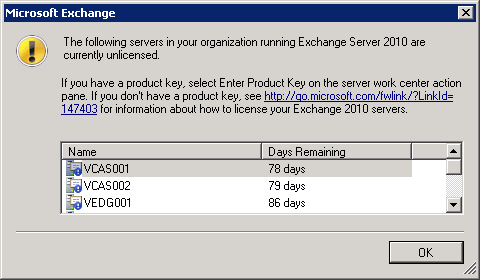
The Exchange Management Console will warn you if one or more servers are still in trial mode:
PowerShell script to set Exchange Static RPC Ports
Author: Remko Weijnen10 Aug
I am currently working on an Exchange migration from 2003 to 2010. For the implementation of a load balancing solution for the CAS/HUB servers I needed to set Static RPC Ports for the RPC Client Access Service and the Exchange Address Book Service.
The procedure of changing these ports is described on the Technet Wiki: Configure Static RPC Ports on an Exchange 2010 Client Access Server
Since I am lazy I decided to do this with a PowerShell script that would automatically do this for all CAS/HUB servers in my 2010 environment.
AD Internals: Display RID Allocation Pools
Author: Remko Weijnen27 Jun
In my previous post I wrote about a problem I had with duplicate RID Allocation pools.
But how do we get more insight into these RID Allocation pools?
The DCDIAG tool can display this information per domain controleler using the following syntax
1 | dcdiag /s:server /v /test:ridmanager |
Example output:

But where in Active Directory is this information stored and can we display it for all Domain Controllers at once for larger environments?
Exchange 2010 well-known object entry install error
Author: Remko Weijnen24 Jun
 Today I was testing the installation of Exchange 2010 in a VMWare sandbox environment. We created the sandbox to test migration from a 2003 AD and Exchange environment to 2008 R2 with Exchange 2010.
We used a P2V to get real copies of the Active Directory and the AD upgrade to 2008 R2 was already tested.
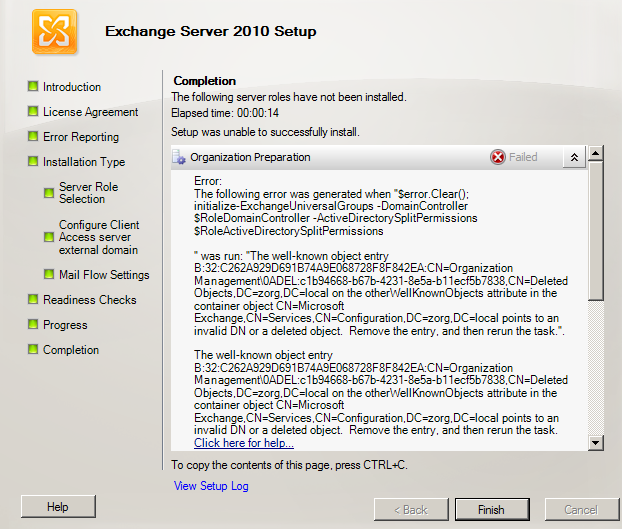
But during the Exchange installation in the sandbox I got the following error:
Profile



Top Posts
- Query Active Directory from Excel
- RNS 510 Startup Logo–My thoughts
- Adding a hidden Exchange mailbox to Outlook
- How rdp passwords are encrypted
- Get Actual CPU Clock Speed with PowerShell
- ClickOnce Applications in Enterprise Environments
- VW RNS 510 Navigation Startup Pictures
- Unattended Installation of IBM System i Access for Windows
- Reading physical memory size from the registry
- Show Client IP Address when using NetScaler as a Reverse Proxy
Recent Comments
Featured Downloads
- AClientFix (13595 downloads )
- AddPrinter2.zip (12854 downloads )
- AdProps (12379 downloads )
- AdSample1 (11432 downloads )
- AMD Radeon Crimson ReLive (29497 downloads )
- Atheros Driver (34019 downloads )
- AutoLogonXP 1.0 (11404 downloads )
- CDZA (9560 downloads )
- ChDrvLetter.zip (11217 downloads )
- ChDrvLetter.zip (14356 downloads )
Blogroll
- Andrew Morgan
- Arnout’s blog
- Assa’s Blog
- Barry Schiffer
- Delphi Praxis
- Ingmar Verheij
- Jedi Api Blog
- Jedi API Library
- Jeroen Tielen
- Kees Baggerman
Categories
- .NET (4)
- Active Directory (28)
- Altiris (36)
- App-V (1)
- Apple (5)
- Application Compatibility (11)
- Automotive (5)
- AWS (1)
- BootCamp (1)
- C# (6)
- C++ (2)
- Citrix (87)
- Delphi (61)
- Embedded (4)
- Exchange (16)
- General (71)
- iPhone (5)
- Java (8)
- Linux (1)
- Lync (2)
- NetScaler (1)
- Oracle (4)
- Other (1)
- Packaging (19)
- PowerShell (56)
- Programming (79)
- Quest (1)
- RES (7)
- script (22)
- ShareFile (1)
- SQL Server (10)
- Strange Error (3)
- Terminal Server (68)
- ThinApp (3)
- ThinKiosk (1)
- Ubuntu (1)
- Unattended Installation (19)
- Uncategorized (51)
- UWP (2)
- Vista (37)
- Visual Studio (1)
- VMWare (26)
- Windows 10 (2)
- Windows 2003 (30)
- Windows 2008 (37)
- Windows 2008 R2 (16)
- Windows 2012 (2)
- Windows 7 (30)
- Windows 8 (4)
- Windows Internals (12)
- Windows XP (16)
Archives
- February 2023 (1)
- October 2022 (3)
- July 2022 (1)
- June 2022 (2)
- October 2019 (1)
- March 2018 (1)
- January 2018 (4)
- December 2017 (3)
- April 2017 (1)
- March 2017 (5)
- February 2017 (4)
- May 2016 (3)
- March 2016 (1)
- October 2015 (2)
- September 2015 (1)
- January 2015 (1)
- August 2014 (1)
- July 2014 (8)
- May 2014 (1)
- November 2013 (1)
- October 2013 (2)
- September 2013 (3)
- August 2013 (4)
- June 2013 (2)
- May 2013 (3)
- April 2013 (5)
- March 2013 (5)
- February 2013 (1)
- January 2013 (5)
- December 2012 (9)
- November 2012 (3)
- October 2012 (3)
- August 2012 (4)
- July 2012 (2)
- June 2012 (1)
- May 2012 (6)
- March 2012 (13)
- February 2012 (12)
- January 2012 (9)
- December 2011 (9)
- November 2011 (4)
- October 2011 (5)
- September 2011 (10)
- August 2011 (10)
- July 2011 (2)
- June 2011 (8)
- May 2011 (12)
- April 2011 (4)
- March 2011 (14)
- February 2011 (8)
- January 2011 (32)
- December 2010 (23)
- November 2010 (19)
- October 2010 (10)
- September 2010 (6)
- August 2010 (1)
- July 2010 (1)
- June 2010 (6)
- March 2010 (7)
- February 2010 (3)
- December 2009 (3)
- November 2009 (11)
- September 2009 (2)
- July 2009 (1)
- June 2009 (5)
- May 2009 (1)
- April 2009 (2)
- March 2009 (3)
- February 2009 (6)
- January 2009 (3)
- December 2008 (8)
- November 2008 (5)
- October 2008 (3)
- September 2008 (3)
- August 2008 (3)
- June 2008 (6)
- May 2008 (2)
- April 2008 (3)
- March 2008 (5)
- January 2008 (3)
- December 2007 (3)
- November 2007 (13)
- October 2007 (10)