Remko Weijnen's Blog (Remko's Blog)
About Virtualization, VDI, SBC, Application Compatibility and anything else I feel like
Archive for the ‘Terminal Server’ Category
Using Fast User Switching on domain XP computers
Author: daNIL30 Jan
As you may know, Fast User Switching (FUS) is not available (disabled) on Windows XP computers joined to a domain, Microsoft confirms this in kb280758.
However, Microsoft doesn’t tell us there’s an undocumented registry value that allows us to have FUS when joined to a domain!
To enable FUS you need to set the DWORD registry value HKLM\SOFTWARE\Microsoft\Windows NT\CurrentVersion\Winlogon\ForceFriendlyUI.
It can also be set by Group Policy at HKLM\SOFTWARE\Microsoft\Windows\CurrentVersion\Policies\System.
When the value is set to 1, and LogonType key is also set to 1, it allows you to use a Friendly UI on a computer joined in a domain:
(more…)
Querying a user token under 64 bit version of 2003/XP
Author: daNIL29 Jan
If you want to obtain a user’s token in a Terminal Server or Citrix session (eg to launch a process in a session) you can call the WTSQueryUserToken function.
On the x64 versions of Windows XP and Server 2003 this function fails however and returns ERROR_INSUFFICIENT_BUFFER (“The data area passed to a system call is too small.”) when called from a 32 bit process.
Internally WTSQueryUserToken calls the undocumented function WinstationQueryInformationW with the WinStationUserToken class (14) and passing a WINSTATIONUSERTOKEN struct, filled with caller ProcessId and ThreadId.
But on x64 Windows the size of this structure is 24 bytes, while on 32 bit Windows the size of the structure is 12 bytes!
Script to install all print drivers on Citrix or Terminal Server
Author: Remko Weijnen25 Jan
I wrote a PowerShell script to install all printer drivers on a Citrix or Terminal Server.
Actually the script isn’t specific to Citrix or Terminal Server but on such environments we need to preload all drivers because users do not have the permissions to do that.
I have chosen for PowerShell because you can do it in a one-liner which makes it easy to run this script from my Altiris server on all Citrix Servers.
The idea is that we enumerate all the shared printers on a Printer Server and make a connection to each printer. This will make sure that the driver is installed if it wasn’t already present.
The script could even be scheduled to enforce that newly added printer drivers are added to each Citrix Server.
SasLibEx Screencast
Author: Remko Weijnen19 Jan
I just recorded a SasLibEx Screencast, it shows some of the very powerfull features of SasLibEx.
The following features are shown:
- Simulate Ctrl Alt Del (Secure Attention Sequence)
- Cancel Ctrl Alt Del
- Lock Workstation
- Unlock Workstation (without credentials)
- Disable Ctrl Alt Del
- Enable Ctrl Alt Del again
- Cancel pending UAC request
- Is Desktop Locked
Self Signing Word Macro’s
Author: Remko Weijnen12 Jan
Today I noticed that a recently added Application to the Citrix Test environment added a Macro to the Office Startup directory.
When a user launches Word he will get a popup because the Template (.dot file) was not signed:
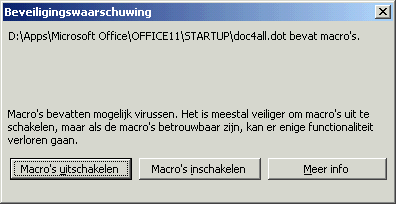
It would have been a lot easier if Application Vendors sign their stuff because in that case I could have just added the certificate using Group Policy (yesterday’s post describes how to do this).
Application Vendors usually tell you that you should lower the Macro security in Office (or Word in this case) to Low to get rid of this message. But I think there’s a better solution: we will sign the .dot file ourselves!
Java Webapplication, certificates and Citrix
Author: Remko Weijnen11 Jan
Yesterday I created an Unattended Installation of a webapplication. Of course it was “just a web link” and the application vendor usually says: you don’t need to install it just go the URL and that’s it.
The reality is usually that you go to the URL and need to install several (ActiveX) components and maybe other dependencies such as Java.
While a user may have the permissions for this on his own pc, on a Citrix or Terminal Server environment this is highly unlikely.
So we need to package and pre-install this for the users.
Nothing special so far but this particular application had some special things that were interesting enough to blog about.
So let’s start with what happened, I visited the URL of an application called Centric Key 2 Financien.
First I got a few popups with Certificates that needed to be accepted:
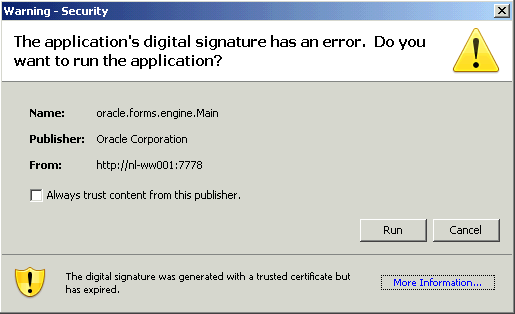
The application’s instructions say that the user must accept this and set the “Always trust content from this publisher” checkbox.
Paging file and Memory Dump
Author: Remko Weijnen7 Jan
I often hear that people configure the Paging File (on Citrix or Terminal Servers) on a seperate volume but, the reasons is either performance or the chance that the Paging File might corrupt the volume.
However if at some point you would like to create a Memory Dump you must have a paging file on the boot volume.
For a Small memory dump you need at least 2MB Paging File on the Boot Volume but for a Full Memory Dump you need a Paging File that is sufficient to hold all the physical RAM plus 1 megabyte (MB).
Side Note: with the increasing ram of today’s servers, how long does it take for a full memory dump to be saved when you have lots of gigabytes?
Default User Profile: Remko’s solution
Author: Remko Weijnen4 Jan
If you are implementing a Citrix, Terminal Server or even just a plain Client-Server environment you will need to create a Default User Profile at some point.
The Default User Profile can be thought of as the initial registry settings that are used when a new profile is created.
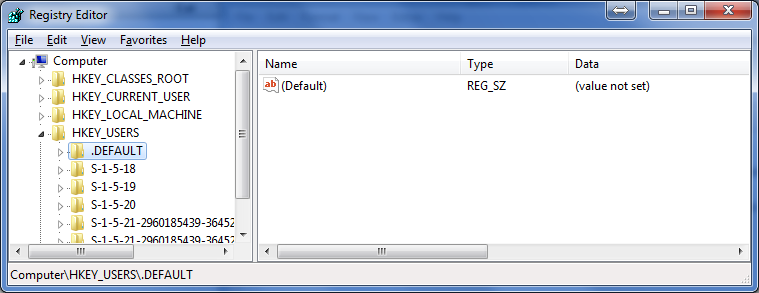
Many people think that the Default User Profile is available in regedit via HKEY_USERS\.Default but this is NOT the Default User Profile.
Terminal Server Remote Keyboard Layout
Author: Remko Weijnen27 Dec
Today I shadowed a user’s session in Citrix and when I wanted to type something I noticed that the keyboard layout was incorrect.
This is and old “friend” that I always tend to forget about. So hopefully this post will help me to remember it :D.
You can prevent this by adding a value “IgnoreRemoteKeyboardLayout” to the registry key HKLM\System\CurrentControlSet\Keyboard Layout:
reg add “HKLM\SYSTEM\CurrentControlSet\Control\Keyboard Layout” /v IgnoreRemoteKeyboardLayout /t REG_DWORD /d 0x00000001 /f
This option has been present since Windows 2000 but was broken in Windows 2003. For Windows 2003 there are two related hotfixes, see kb 842136 and kb 917910.
Default Explorer View
Author: Remko Weijnen19 Dec
As you probably know there are several different Folder Views in Windows Explorer:
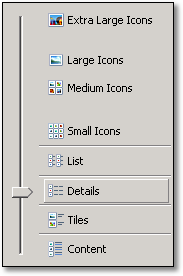
The Explorer keeps tracks of the last used View per Folder in the registry in the key HKEY_CURRENT_USER\Software\Microsoft\Windows\Shell\Bags. This KB article sort of desribes this functionality.
Profile



Top Posts
- Query Active Directory from Excel
- RNS 510 Startup Logo–My thoughts
- Adding a hidden Exchange mailbox to Outlook
- How rdp passwords are encrypted
- Get Actual CPU Clock Speed with PowerShell
- ClickOnce Applications in Enterprise Environments
- VW RNS 510 Navigation Startup Pictures
- Unattended Installation of IBM System i Access for Windows
- Reading physical memory size from the registry
- Show Client IP Address when using NetScaler as a Reverse Proxy
Recent Comments
Featured Downloads
- AClientFix (13595 downloads )
- AddPrinter2.zip (12854 downloads )
- AdProps (12379 downloads )
- AdSample1 (11432 downloads )
- AMD Radeon Crimson ReLive (29575 downloads )
- Atheros Driver (34019 downloads )
- AutoLogonXP 1.0 (11404 downloads )
- CDZA (9560 downloads )
- ChDrvLetter.zip (11217 downloads )
- ChDrvLetter.zip (14356 downloads )
Blogroll
- Andrew Morgan
- Arnout’s blog
- Assa’s Blog
- Barry Schiffer
- Delphi Praxis
- Ingmar Verheij
- Jedi Api Blog
- Jedi API Library
- Jeroen Tielen
- Kees Baggerman
Categories
- .NET (4)
- Active Directory (28)
- Altiris (36)
- App-V (1)
- Apple (5)
- Application Compatibility (11)
- Automotive (5)
- AWS (1)
- BootCamp (1)
- C# (6)
- C++ (2)
- Citrix (87)
- Delphi (61)
- Embedded (4)
- Exchange (16)
- General (71)
- iPhone (5)
- Java (8)
- Linux (1)
- Lync (2)
- NetScaler (1)
- Oracle (4)
- Other (1)
- Packaging (19)
- PowerShell (56)
- Programming (79)
- Quest (1)
- RES (7)
- script (22)
- ShareFile (1)
- SQL Server (10)
- Strange Error (3)
- Terminal Server (68)
- ThinApp (3)
- ThinKiosk (1)
- Ubuntu (1)
- Unattended Installation (19)
- Uncategorized (51)
- UWP (2)
- Vista (37)
- Visual Studio (1)
- VMWare (26)
- Windows 10 (2)
- Windows 2003 (30)
- Windows 2008 (37)
- Windows 2008 R2 (16)
- Windows 2012 (2)
- Windows 7 (30)
- Windows 8 (4)
- Windows Internals (12)
- Windows XP (16)
Archives
- February 2023 (1)
- October 2022 (3)
- July 2022 (1)
- June 2022 (2)
- October 2019 (1)
- March 2018 (1)
- January 2018 (4)
- December 2017 (3)
- April 2017 (1)
- March 2017 (5)
- February 2017 (4)
- May 2016 (3)
- March 2016 (1)
- October 2015 (2)
- September 2015 (1)
- January 2015 (1)
- August 2014 (1)
- July 2014 (8)
- May 2014 (1)
- November 2013 (1)
- October 2013 (2)
- September 2013 (3)
- August 2013 (4)
- June 2013 (2)
- May 2013 (3)
- April 2013 (5)
- March 2013 (5)
- February 2013 (1)
- January 2013 (5)
- December 2012 (9)
- November 2012 (3)
- October 2012 (3)
- August 2012 (4)
- July 2012 (2)
- June 2012 (1)
- May 2012 (6)
- March 2012 (13)
- February 2012 (12)
- January 2012 (9)
- December 2011 (9)
- November 2011 (4)
- October 2011 (5)
- September 2011 (10)
- August 2011 (10)
- July 2011 (2)
- June 2011 (8)
- May 2011 (12)
- April 2011 (4)
- March 2011 (14)
- February 2011 (8)
- January 2011 (32)
- December 2010 (23)
- November 2010 (19)
- October 2010 (10)
- September 2010 (6)
- August 2010 (1)
- July 2010 (1)
- June 2010 (6)
- March 2010 (7)
- February 2010 (3)
- December 2009 (3)
- November 2009 (11)
- September 2009 (2)
- July 2009 (1)
- June 2009 (5)
- May 2009 (1)
- April 2009 (2)
- March 2009 (3)
- February 2009 (6)
- January 2009 (3)
- December 2008 (8)
- November 2008 (5)
- October 2008 (3)
- September 2008 (3)
- August 2008 (3)
- June 2008 (6)
- May 2008 (2)
- April 2008 (3)
- March 2008 (5)
- January 2008 (3)
- December 2007 (3)
- November 2007 (13)
- October 2007 (10)