Remko Weijnen's Blog (Remko's Blog)
About Virtualization, VDI, SBC, Application Compatibility and anything else I feel like
Archive for the ‘Terminal Server’ Category
Executing a Fast User Switch programmatically – part 2
Author: daNIL26 Nov
Let’s write our own Credential Server implementation.
At first, we need to create a named pipe with a unique name. Let’s construct the pipe name using a GUID – this should be unique, but we can do it in a cycle to be absolutely sure: (more…)
Executing a Fast User Switch programmatically – part 1
Author: daNIL26 Nov
I think many of you have got experience with multiple Terminal Server Sessions in windows XP, also called Fast User Switching (FUS). Let’s get inside this cool feature.
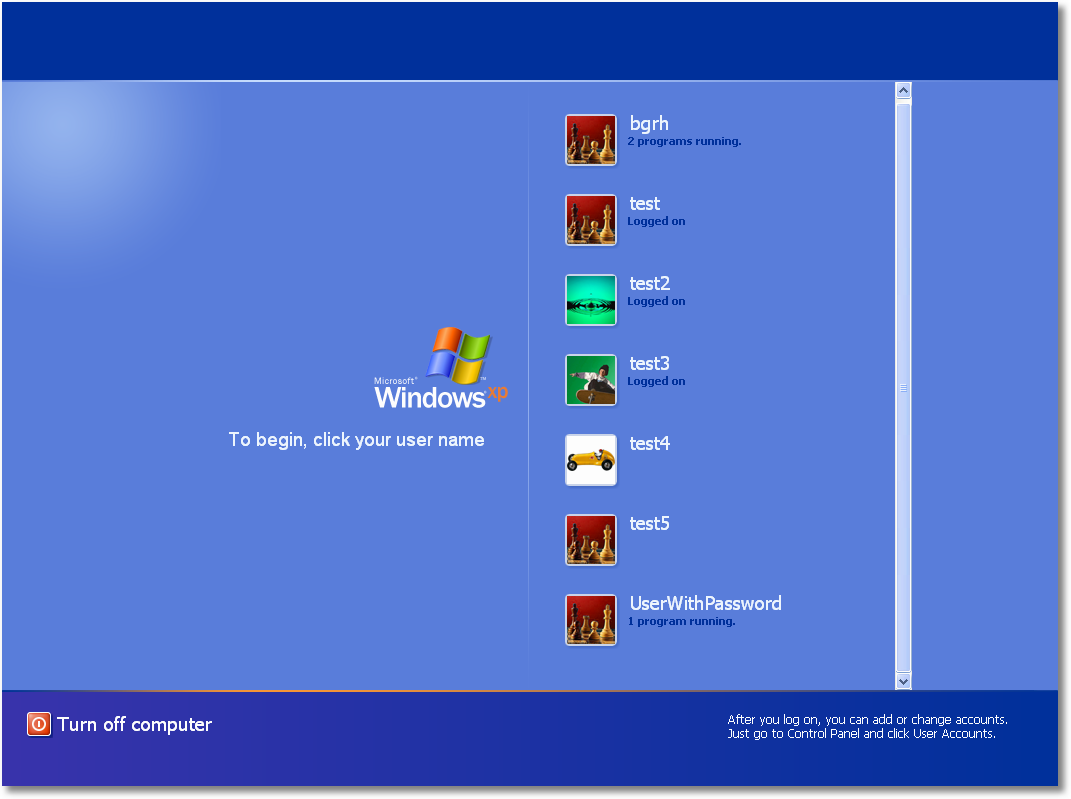
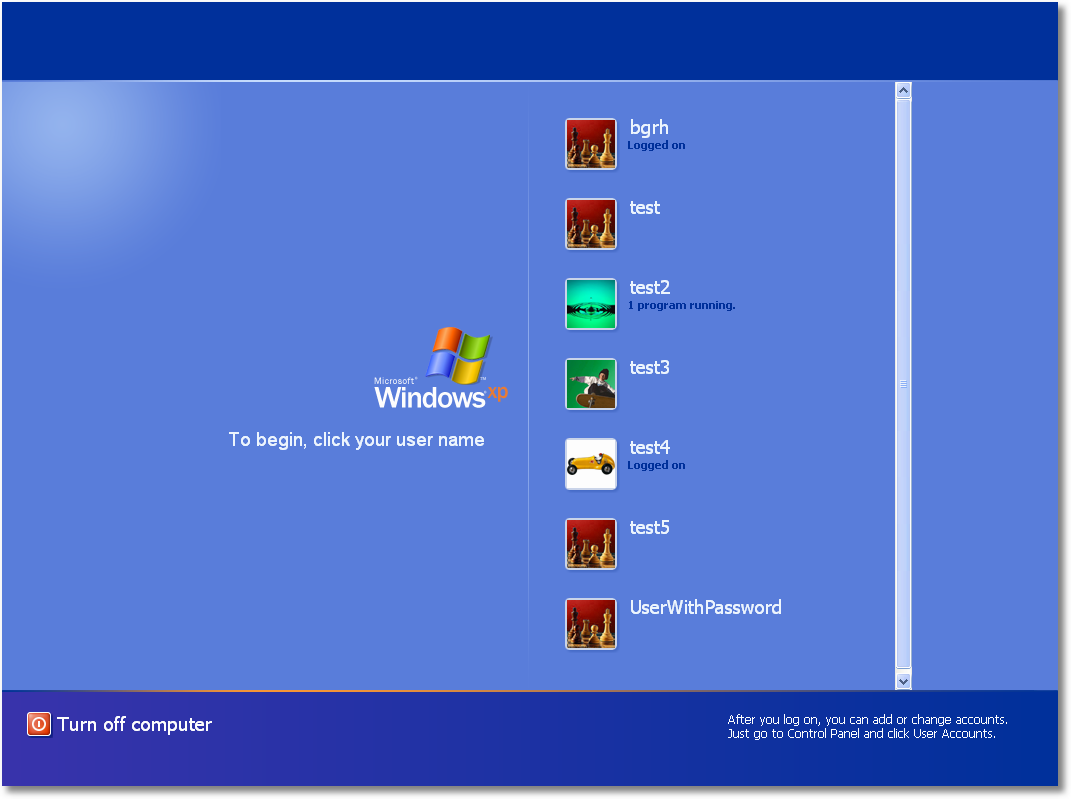
How does FUS work? Each session has its own winlogon.exe. It draws the same interface which looks like the screenshot below:
Terminal Server Internals
Author: daNIL19 Nov
Hello, my name is Danila Galimov and i will write here sometimes 🙂
My first post is about communications between Terminal Server sessions and Terminal Server service process (termsrv.exe/dll). Terminal Server service needs to communicate with each session for many tasks, such as sending window message, getting message reply and so on. So, on init, Terminal Server creates a SmSsWinStationApiPort port in global namespace and runs a few WinStationLpcThread threads, which are listening on port and are used to process port messages. When csrss.exe is started, it parses its command line, which usually looks like:
%SystemRoot%\system32\csrss.exe ObjectDirectory=\Windows SharedSection=4096,4096,1024 Windows=On SubSystemType=Windows ServerDll=basesrv,1 ServerDll=winsrv:UserServerDllInitialization,3 ServerDll=winsrv:ConServerDllInitialization,2 ProfileControl=Off MaxRequestThreads=16
and loads the required dlls (winsrv.dll in our case). Initialization of winsrv.dll creates a thread, which connects to SmSsWinStationApiPort port and does the loop for processing Terminal Server messages until it receives WinStationTerminate message.
We’ll try to fool Terminal Server (more…)
RDP Session with Local Taskbar visible
Author: Remko Weijnen2 Nov
I usually have lots of Terminal Server sessions open when I’m working, both direct sessions but also “sessions in sessions”. In order to keep overview on my desktop I prefer to make the session size as big as possible without being full screen (so keep my local taskbar visible).
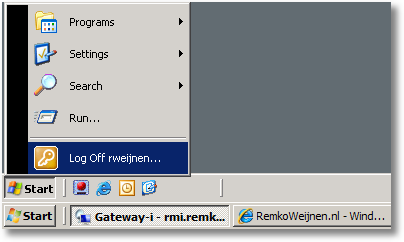
If I run a session in a session I do this again, this makes switching sessions very easy and you can always see which session you are in:
Patch Windows 2008 Terminal Server to allow more than 2 concurrent sessions
Author: Remko Weijnen21 Oct
Well it took some time but I patched Terminal Server for Windows 2008 to allow unlimited sessions in Remote Administration mode.
This patch is for 32 bit English version. In order to install it you need to perform the steps below. Before you start please check if using this patch is allowed according to your country’s law and your license agreement.
Patch Windows 2003 Terminal Server to allow more than 2 concurrent sessions
Author: Remko Weijnen31 Aug
As you might know Windows 2003 Server accepts at most 2 concurrent Terminal Server sessions (and 1 console session) in Remote Administration mode (which is the default). Of course if you switch to Application Mode you can have an unlimited number of sessions but this requires licenses and a license server.
When Terminal Server creates a new session it checks if the new session is either a console session or a help assistant session and if not it allocates a license. The function that performs this check is called CRAPolicy::Logon (more…)
Multiple Concurrent Terminal Server Sessions On Vista SP1
Author: Remko Weijnen14 Jun
There are several patched terminal server dll’s floating around in the net to allow multiple concurrent Terminal Server session on Windows Vista with Service Pack 1. But they all have the same limitations:
It’s not possible to start a session to Localhost, this is because the Terminal Server client does a check to see if you are running Personal Terminal Server (Vista/XP) and denies Localhost or 127.0.0.1 if true (127.0.0.2 works though).
It’s not possible to start multiple sessions with the same user. The patch for Vista RTM did allow for this but in Service Pack 1 some Terminal Server code has moved to the Local Session Manager (lsm.exe) so we need to patch this file as well.
Offcourse we need to patch Terminal Server to allow unlimited session on Vista as well.
VPatch files are in the download link below.
Vista SP1 Patches (8951 downloads )Terminal Server Ping Tool
Author: Remko Weijnen13 Jun
A while ago I included a new undocumented API into my JwaWinsta unit which is called WinStationServerPing. This API “pings” a Terminal or Citrix server and verifies that Terminal Server is up and running. It is not the same as a regular networking ping! This API actually makes a connection to a (remote) Terminal Server and verifies that Terminal Server runs and accepts connections.
I wrote a small cmdline tool that uses this API to ping a Terminal Server which can be used to quickly determine if a Terminal Server is up and running. I named it WTSPing.
So how does it work? Open up a command prompt (Start -> Run -> cmd) and type WTSPing /? to see the help:
How rdp passwords are encrypted 2
Author: Remko Weijnen2 Mar
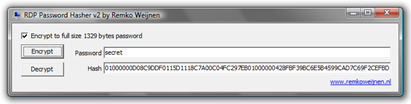
Several months ago I wrote about encrypting and decrypting RDP passwords. I left one thing open: encrypting the password up to the full 1329 bytes as mstsc does.
Many people were curious about it so I hope the answer is not a disappointment because it’s actually really simple (but I took me a while to figure that out nonetheless). In what I figure is an attempt to hide the password length mstsc always fills up the password with zeroes until it has 512 bytes length.
Then the password is encrypted like I described earlier which gives us a 1328 bytes password hash. So we have one mystery left, how to reach the 1329 bytes size which still is a strange value since the password is in Unicode which takes 2 bytes per char (so the size should be even).
As it turns out, mstsc just adds a zero!
Vista SP1 changes to Terminal Server API
Author: Remko Weijnen2 Mar
In a previous article I wrote about changes in utildll in vista that breaked compatibality for Terminal Server. Even though release notes for Service Pack 1 don’t indicate changes or fixes in this area my testing shows that Microsoft has taken over the Windows 2008 implementation of utildll to Vista.
This is a good thing, because applications depending on utildll work again. I have updated JwaWinsta for SP1, all Vista versions of the utildll functions are renamed to VistaRTM and all Safe functions were updated to check for SP1. This means that the Safe functions can be used on all OS versions and Service packs! You are strongly advised to use only the Safe functions.
Some observations with SP1:
- I quickly tested TSAdmin as well and it seems to work again, only noticable flaw is that the console sessions returns an idle time of 17642 days (Reported Last Input Time is 01-01-1601 but utildll’s ElapsedTimeString function doesn’t account for dates this long in the past).
- WTSApi32.dll contains some new functions like WTSStartRemoteControlSession and WTSStopRemoteControlSession (which are wrappers to WinStationShadow).
- The WTSWaitSystemEvent bug I wrote about earlier is still present. I advise to check for winsta.dll version >= 6.0.6000.20664 in code when using this API and advise user to install the Hotfix.
Update: I just tried to install hotfix KB941561 but this fail with the error: The update does not apply to your system. If you do want to get this bug fixed you need to manually replace winsta.dll (take ownership and set permissions to full control). winsta.dll from hotfix KB941561 (X86) (4362 downloads )
Profile



Top Posts
- Query Active Directory from Excel
- RNS 510 Startup Logo–My thoughts
- Adding a hidden Exchange mailbox to Outlook
- How rdp passwords are encrypted
- Get Actual CPU Clock Speed with PowerShell
- ClickOnce Applications in Enterprise Environments
- VW RNS 510 Navigation Startup Pictures
- Unattended Installation of IBM System i Access for Windows
- Reading physical memory size from the registry
- Show Client IP Address when using NetScaler as a Reverse Proxy
Recent Comments
Featured Downloads
- AClientFix (13595 downloads )
- AddPrinter2.zip (12854 downloads )
- AdProps (12379 downloads )
- AdSample1 (11432 downloads )
- AMD Radeon Crimson ReLive (24845 downloads )
- Atheros Driver (34019 downloads )
- AutoLogonXP 1.0 (11404 downloads )
- CDZA (9560 downloads )
- ChDrvLetter.zip (11217 downloads )
- ChDrvLetter.zip (14356 downloads )
Blogroll
- Andrew Morgan
- Arnout’s blog
- Assa’s Blog
- Barry Schiffer
- Delphi Praxis
- Ingmar Verheij
- Jedi Api Blog
- Jedi API Library
- Jeroen Tielen
- Kees Baggerman
Categories
- .NET (4)
- Active Directory (28)
- Altiris (36)
- App-V (1)
- Apple (5)
- Application Compatibility (11)
- Automotive (5)
- AWS (1)
- BootCamp (1)
- C# (6)
- C++ (2)
- Citrix (87)
- Delphi (61)
- Embedded (4)
- Exchange (16)
- General (71)
- iPhone (5)
- Java (8)
- Linux (1)
- Lync (2)
- NetScaler (1)
- Oracle (4)
- Other (1)
- Packaging (19)
- PowerShell (56)
- Programming (79)
- Quest (1)
- RES (7)
- script (22)
- ShareFile (1)
- SQL Server (10)
- Strange Error (3)
- Terminal Server (68)
- ThinApp (3)
- ThinKiosk (1)
- Ubuntu (1)
- Unattended Installation (19)
- Uncategorized (51)
- UWP (2)
- Vista (37)
- Visual Studio (1)
- VMWare (26)
- Windows 10 (2)
- Windows 2003 (30)
- Windows 2008 (37)
- Windows 2008 R2 (16)
- Windows 2012 (2)
- Windows 7 (30)
- Windows 8 (4)
- Windows Internals (12)
- Windows XP (16)
Archives
- February 2023 (1)
- October 2022 (3)
- July 2022 (1)
- June 2022 (2)
- October 2019 (1)
- March 2018 (1)
- January 2018 (4)
- December 2017 (3)
- April 2017 (1)
- March 2017 (5)
- February 2017 (4)
- May 2016 (3)
- March 2016 (1)
- October 2015 (2)
- September 2015 (1)
- January 2015 (1)
- August 2014 (1)
- July 2014 (8)
- May 2014 (1)
- November 2013 (1)
- October 2013 (2)
- September 2013 (3)
- August 2013 (4)
- June 2013 (2)
- May 2013 (3)
- April 2013 (5)
- March 2013 (5)
- February 2013 (1)
- January 2013 (5)
- December 2012 (9)
- November 2012 (3)
- October 2012 (3)
- August 2012 (4)
- July 2012 (2)
- June 2012 (1)
- May 2012 (6)
- March 2012 (13)
- February 2012 (12)
- January 2012 (9)
- December 2011 (9)
- November 2011 (4)
- October 2011 (5)
- September 2011 (10)
- August 2011 (10)
- July 2011 (2)
- June 2011 (8)
- May 2011 (12)
- April 2011 (4)
- March 2011 (14)
- February 2011 (8)
- January 2011 (32)
- December 2010 (23)
- November 2010 (19)
- October 2010 (10)
- September 2010 (6)
- August 2010 (1)
- July 2010 (1)
- June 2010 (6)
- March 2010 (7)
- February 2010 (3)
- December 2009 (3)
- November 2009 (11)
- September 2009 (2)
- July 2009 (1)
- June 2009 (5)
- May 2009 (1)
- April 2009 (2)
- March 2009 (3)
- February 2009 (6)
- January 2009 (3)
- December 2008 (8)
- November 2008 (5)
- October 2008 (3)
- September 2008 (3)
- August 2008 (3)
- June 2008 (6)
- May 2008 (2)
- April 2008 (3)
- March 2008 (5)
- January 2008 (3)
- December 2007 (3)
- November 2007 (13)
- October 2007 (10)