Remko Weijnen's Blog (Remko's Blog)
About Virtualization, VDI, SBC, Application Compatibility and anything else I feel like
Archive for the ‘VMWare’ Category
Compiling Drivers for Altiris Linux PXE Image Part 2
Author: Remko Weijnen17 Mar
In the previous part we have already setup the Ubuntu Virtual Machine and we did a build of the kernel image.
So now we can finally compile the driver, in my case I needed a driver for VMWare’s VMXNET3 Network Card.
VMXNET3 is VMWare’s paravirtualized network driver and offers better performance with less host processing power compared to the default e1000 driver.
First we need the source for the driver, we can obtain this from the VMWare Tools either from a running Linux VM or like I did by transferring the file linux.iso from /vmimages/tools-isomages from the vSphere server.
In the iso file is a single file, VMWARETO.TGZ and after unpacking we get a folder called vmware-tools-distrib.
In vmware-tools-distrib/lib/modules/source we find the vmxnet3.tar file that contains our sources. Copy the tar to the Virtual Machine and unpack it, then start a Terminal and cd to the directory where you unpacked the tar.
The first time I attempted a compile I received an error indicating that the file autoconf.h could not be found. After I found this bug report I was able to fix this by creating a link:
1 | sudo ln -s /usr/src/linux-headers-2.6.35-22-generic/include/generated/autoconf.h /usr/src/linux-headers-2.6.35-22-generic/include/linux/autoconf.h |
We can compile the driver with the make command, referencing the kernel image we created earlier:
Compiling Drivers for Altiris Linux PXE Image Part 1
Author: Remko Weijnen17 Mar
First we need to setup a Linux Virtual Machine with a distro of choice (I recommend a 32 bit version). I will be using Ubuntu here and the first step is to download the iso.
At the time of writing Ubuntu 10.10 was the Latest version so I used that one.
Create a new Virtual Machine and use the iso as install media, I am using VMWare Workstation and it recognises Ubuntu and performs an “easy install”:
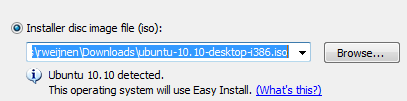
The install is unattended (when VMWare Tools are installed you need to perform a login) and took only 6 minutes on my laptop!
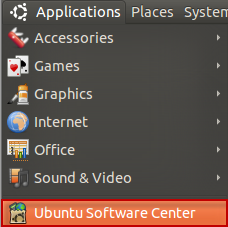
Now we need to install gcc (the compiler), open the Ubuntu Software Center:
STOP: 0x0000005D when booting Windows PE
Author: Remko Weijnen15 Mar
I was booting a new VMWare Virtual Machine with Windows PE through Altiris for initial deployment but Windows PE halted with a BSOD:

0x0000005D means UNSUPPORTED_PROCESSOR (defined in bugcodes.h) so I expected there was a x86 vs x64 problem.
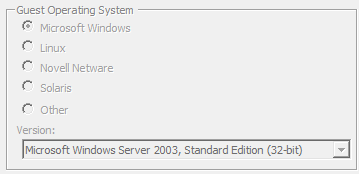
The VM was configured for a 32 bit OS:
The Altiris Job was configured to use Auto Select:

But instead of the x86 version of Windows PE, Altiris attempts to boot the x64 version and this explains the BSOD: VMWare prevents the CPU from going to x64 mode and thus Windows has no choice but to halt.
Workaround is to change the Automation pre-boot environment in Altiris to x86:

Note that it’s no problem to deploy an x64 OS using the x86 version of Windows PE so I don’t see any real problems with this workaround.
Windows 2003 align OS disk
Author: Remko Weijnen14 Mar
If you read one of VMWare’s Best Practices Guides (in my case this one) then you may have read that it’s important to align guest partitions.
We can do this (for Windows OS) using the DiskPart tool that comes with the OS since Windows 2003 SP1 (there is a hotfix for earlier versions).
On Windows 2008, and higher, all partitions are automatically aligned to a 1 MB boundary.
But how to do this for the OS disk on Server 2003?
My first thought was to open a command prompt during setup, right before creating the partitions and then use diskpart.
However the OS partition is created during the Text portion of the install process and even though we can get a cmd prompt using SHIFT-F10 we get the recovery console (which has a builtin diskpart but cannot align).
So I used a Windows PE bootdisk. Any version with Diskpart should do but I used a bootdisk from Symantec Backup Exec System Recovery that I’ve customized to my own needs.
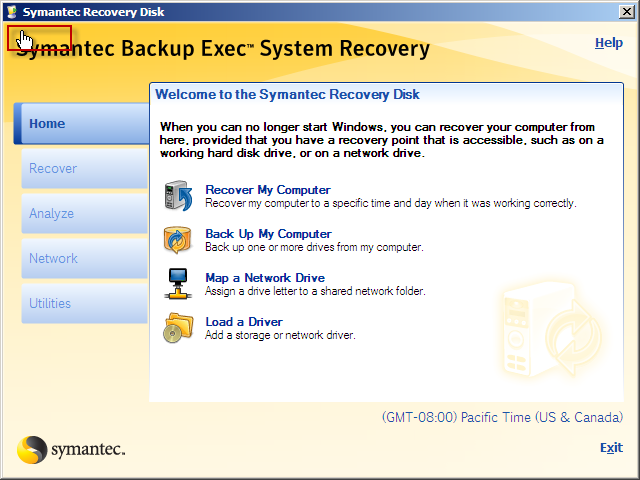
If you boot the original Symantec disk you can open a command prompt by accessing a hidden feature: move the mouse above the “S” from Symantec until you get a Hand icon and press the left mouse button:
Booting a Virtual Machine from USB Drive
Author: Remko Weijnen14 Mar
I wanted to boot a Virtual Machine from an USB Stick but even though you can Connect USB devices to VMWare you cannot boot from it.
It can be done however using a boot manager that is able to perform a boot from USB media. I used Plop Boot Manager.
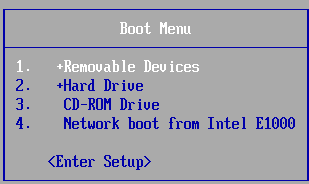
Download one of the stable releases (I used 5.0.11-2) and extract plpbt.img from the archive and mount this (don’t forget to select the Connect at power on option) and when booting press Esc for the Boot Menu.
This would be a good time to Connect the USB device to the Virtual Machine, right click the USB device in the bottom bar:
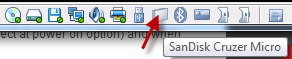
And select the Connect option:

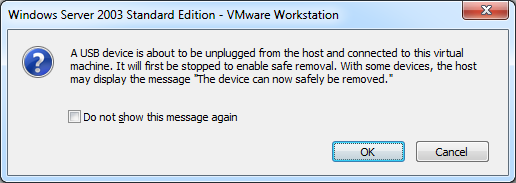
Click OK on the warning message:
The case of the UPS discovery not working
Author: Remko Weijnen24 Jan
I am doing a project involving a Citrix Xenapp environment running on VMWare vSphere.
The physical machines are powered by two Eaton Uninterruptable Power Supplies that both a network card.
I received some documentation that describes how to implement automatic shutdown in a VMWare vSphere environment.
This documentation describes that a vSphere Management Assistant (vMA) must be deployed in which we need to install some software from Eaton.
I followed the documentation that even described the needed iptables rules needed for their software.
In the last step a discovery is done and the UPS is supposed to be found. And you have probably guessed by now: it didn’t!
At first I figured that maybe the iptables configuration was still too tight so I stopped the iptables service but that didn’t help.
BSOD with STOP 0x0000008E when installing Window 7 Checked Build
Author: Remko Weijnen6 Dec
I was trying to install a checked build of Windows 7 under VMWare Workstation but after the first reboot during the install (the completing installation step) the system came up with a BSOD.
It can be fixed by adding a line to the VMX configuration file:
piix4pm.smooth_acpi_timer = TRUE
Performance Best Practices for VMware vSphere 4.1
Author: Remko Weijnen4 Nov
VMware has released an updated Performance Best Practices for VMware vSphere document for 4.1.
The document provides tips that help administrators maximize the performance of VMware vSphere 4.1.
Chapter 1 – “Hardware for Use with VMware vSphere,” provides guidance on selecting hardware for use with vSphere.
Chapter 2 – “ESX and Virtual Machines,” provides guidance regarding VMware ESX™ software and the virtual machines that run in it.
Chapter 3 – “Guest Operating Systems,” provides guidance regarding the guest operating systems running in vSphere virtual machines.
Chapter 4 – “Virtual Infrastructure Management,” provides guidance regarding resource management best practices.
Links: Technical Resource Center (direct link to the Document).
Earlier versions:
Programmatically Create Aligned Partitions
Author: Remko Weijnen4 Nov
After deploying Virtual Machines from a template and adding disks the next Task was to create and format the partitions.
In a VMWare environment it is very important to assure that the partitions are aligned. VMWare has a nice document that explains the details called Performance Best Practices for VMware vSphere 4.0.
Basically the recommendation is to align partition on a 64 KB boundary, not only for VMWare itsself but also for the guests.
Of course we could do this manually but I wanted to run this task of from my Deployment Server to automate the following:
- Create aligned partitions on all extra disks of the maximum size
- Format, assign drive letter and assign a label
- A safeguard to prevent overwriting existing Data
Well enough talk let’s go the scripts! They are written as bat files that can be executed directly in Altiris as an embedded script but of course you don’t need Altiris to use them. (more…)
VM not joined to Domain after Deploying from Template
Author: Remko Weijnen3 Nov
As I wrote earlier today I am provisioning Virtual Machines with PowerCLI. I don’t know if this is intentional behaviour but after Deploying (Cloning) a Virtual Machine from a template the Network Adapter is not automatically connected at power on.
This made the Join Domain operation which is party of the Customization Specification to fail. I noticed this in the log file which can be found in %WINDIR%\Temp\vmware-imc\guestcust.log:
Joining domain mydomain using account mydomain\myaccount and password ‘*****’
The specified domain either does not exist or could not be contacted.
So I wrote a small fix script in PowerCLI:
1 2 3 4 5 6 7 8 | ForEach ($VM in Get-VM) { ForEach ($NetworkAdapter in $VM.NetworkAdapters) { Write-Host "Set-NetworkAdapter -NetworkAdapter $NetworkAdapter -StartConnected $true" -ForegroundColor Blue Set-NetworkAdapter -NetworkAdapter $NetworkAdapter -StartConnected $true -Confirm:$false } } |
And of course I changed the Provisioning script to do this as well 😀
Profile



Top Posts
- Query Active Directory from Excel
- RNS 510 Startup Logo–My thoughts
- Adding a hidden Exchange mailbox to Outlook
- How rdp passwords are encrypted
- Get Actual CPU Clock Speed with PowerShell
- ClickOnce Applications in Enterprise Environments
- VW RNS 510 Navigation Startup Pictures
- Unattended Installation of IBM System i Access for Windows
- Reading physical memory size from the registry
- Show Client IP Address when using NetScaler as a Reverse Proxy
Recent Comments
Featured Downloads
- AClientFix (13595 downloads )
- AddPrinter2.zip (12854 downloads )
- AdProps (12379 downloads )
- AdSample1 (11432 downloads )
- AMD Radeon Crimson ReLive (25996 downloads )
- Atheros Driver (34019 downloads )
- AutoLogonXP 1.0 (11404 downloads )
- CDZA (9560 downloads )
- ChDrvLetter.zip (11217 downloads )
- ChDrvLetter.zip (14356 downloads )
Blogroll
- Andrew Morgan
- Arnout’s blog
- Assa’s Blog
- Barry Schiffer
- Delphi Praxis
- Ingmar Verheij
- Jedi Api Blog
- Jedi API Library
- Jeroen Tielen
- Kees Baggerman
Categories
- .NET (4)
- Active Directory (28)
- Altiris (36)
- App-V (1)
- Apple (5)
- Application Compatibility (11)
- Automotive (5)
- AWS (1)
- BootCamp (1)
- C# (6)
- C++ (2)
- Citrix (87)
- Delphi (61)
- Embedded (4)
- Exchange (16)
- General (71)
- iPhone (5)
- Java (8)
- Linux (1)
- Lync (2)
- NetScaler (1)
- Oracle (4)
- Other (1)
- Packaging (19)
- PowerShell (56)
- Programming (79)
- Quest (1)
- RES (7)
- script (22)
- ShareFile (1)
- SQL Server (10)
- Strange Error (3)
- Terminal Server (68)
- ThinApp (3)
- ThinKiosk (1)
- Ubuntu (1)
- Unattended Installation (19)
- Uncategorized (51)
- UWP (2)
- Vista (37)
- Visual Studio (1)
- VMWare (26)
- Windows 10 (2)
- Windows 2003 (30)
- Windows 2008 (37)
- Windows 2008 R2 (16)
- Windows 2012 (2)
- Windows 7 (30)
- Windows 8 (4)
- Windows Internals (12)
- Windows XP (16)
Archives
- February 2023 (1)
- October 2022 (3)
- July 2022 (1)
- June 2022 (2)
- October 2019 (1)
- March 2018 (1)
- January 2018 (4)
- December 2017 (3)
- April 2017 (1)
- March 2017 (5)
- February 2017 (4)
- May 2016 (3)
- March 2016 (1)
- October 2015 (2)
- September 2015 (1)
- January 2015 (1)
- August 2014 (1)
- July 2014 (8)
- May 2014 (1)
- November 2013 (1)
- October 2013 (2)
- September 2013 (3)
- August 2013 (4)
- June 2013 (2)
- May 2013 (3)
- April 2013 (5)
- March 2013 (5)
- February 2013 (1)
- January 2013 (5)
- December 2012 (9)
- November 2012 (3)
- October 2012 (3)
- August 2012 (4)
- July 2012 (2)
- June 2012 (1)
- May 2012 (6)
- March 2012 (13)
- February 2012 (12)
- January 2012 (9)
- December 2011 (9)
- November 2011 (4)
- October 2011 (5)
- September 2011 (10)
- August 2011 (10)
- July 2011 (2)
- June 2011 (8)
- May 2011 (12)
- April 2011 (4)
- March 2011 (14)
- February 2011 (8)
- January 2011 (32)
- December 2010 (23)
- November 2010 (19)
- October 2010 (10)
- September 2010 (6)
- August 2010 (1)
- July 2010 (1)
- June 2010 (6)
- March 2010 (7)
- February 2010 (3)
- December 2009 (3)
- November 2009 (11)
- September 2009 (2)
- July 2009 (1)
- June 2009 (5)
- May 2009 (1)
- April 2009 (2)
- March 2009 (3)
- February 2009 (6)
- January 2009 (3)
- December 2008 (8)
- November 2008 (5)
- October 2008 (3)
- September 2008 (3)
- August 2008 (3)
- June 2008 (6)
- May 2008 (2)
- April 2008 (3)
- March 2008 (5)
- January 2008 (3)
- December 2007 (3)
- November 2007 (13)
- October 2007 (10)