Remko Weijnen's Blog (Remko's Blog)
About Virtualization, VDI, SBC, Application Compatibility and anything else I feel like
Archive for the ‘Windows 7’ Category
The publisher could not be verified when launching an application with RES Workspace Manager
Author: Remko Weijnen13 Sep
Today I was troubleshooting a warning message that popped up when launching a network application with RES Workspace Manager:
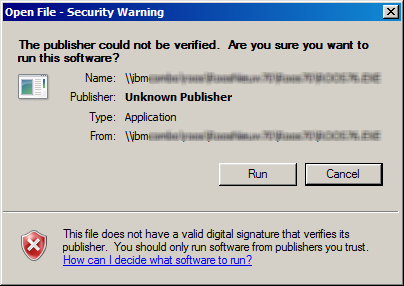
Usually this is a simple fix: add the servername (file://server) to the Local Intranet zone:
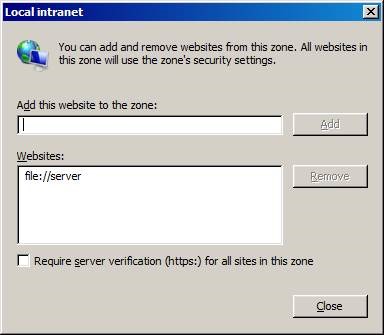
That worked when I launched the application directly. However when launching the application with RES Workspace Manager I would still get the warning. Even stranger: when I clicked Cancel the application would still be launched.
RD Gateway connection fails on Windows 7
Author: Remko Weijnen15 Aug
I needed to connect remotely via Remote Desktop to a Windows Server 2012 machine.
I received an rdp file that was configured to use an RD Gateway server:
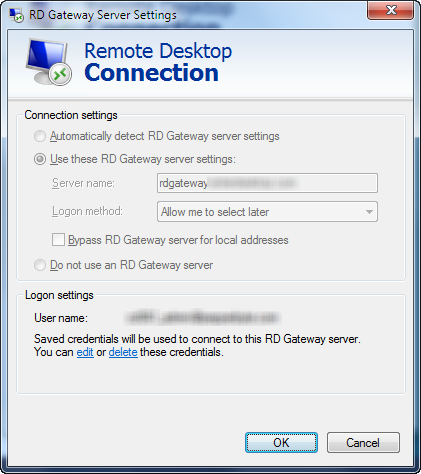
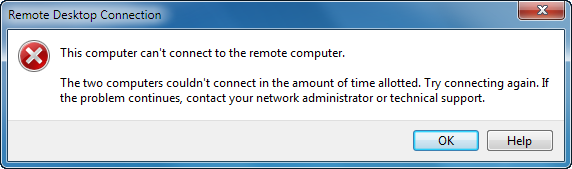
However when trying to connect from my Windows 7 laptop (x64) machine, I got the following error message:
ClickOnce Applications in Enterprise Environments
Author: Remko Weijnen5 Aug
ClickOnce is a Microsoft technology that enables an end user to install an application from the web without administrative permissions.
That’s great isn’t it?
While ClickOnce may sound great to developers it’s actually a nightmare for Enterprise administrators because they try to prevent users from installing software themselves.
ClickOnce also incorporates an Automatic Updates mechanism which means that users might run different or not tested/approved versions…
Virtual Environments
It get’s even worse in virtual environments such as VDI and SBC where machines are often non-persistent. Each time the users starts the application they will see a screen similar to the one below while they actually download and install it over and over again:
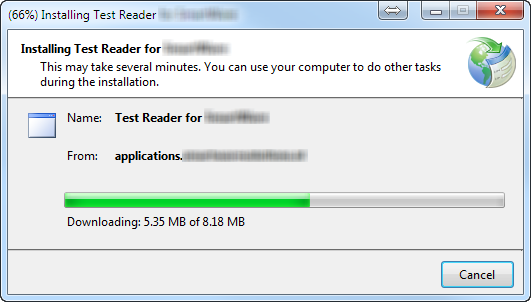
If the environment is persistent, it’s not guaranteed that the user works on the same machine each day. This means that the application will be installed on every box the user ever logs onto…
How does it work?
In order to understand how we can best treat ClickOnce applications we need to understand how they work since MSDN documentation does not describe this in detail.
My Network Places Internals
Author: Remko Weijnen19 Jul
 I am using a PowerShell script to copy some elements of from the users old profile location to a new location. This includes the Nethood ("My Network Places") folder which contains the Network Places shortcuts.
A user reported that she could not save documents to Network Places anymore and after inspection the Network Places shortcuts were broken.
I started comparing the old Nethood folder to the new and observed the following difference in Explorer:

When copying entries from the Nethood folder with Explorer manually they worked fine, so somehow Explorer gives the Nethood folder special treatment.
Switching to the Services Session
Author: Remko Weijnen24 Feb
Just read a tweet from @andyjmorgan about Interactive Service Detection. This made me remember that it’s possible to switch to the Session 0 with an undocumented api in winsta.dll.
For this API to work you must have the Interactive Services Detection (UI0Detect) service running.
Hibernation fails in Windows 7
Author: Remko Weijnen10 Feb
 A while ago my Windows 7 laptop suddenly refused to go into Hibernation. The strange thing was that the whole process of saving memory to the hibernate file seemed to work correctly. The screen would go black and there was lots of disk activity. Then after the disk activity finished the system would return to the logon screen.
A Google on this issue learned that the most likely cause was a driver preventing the system from going into hibernation. Using the cmdline “powercfg -DEVICEQUERY wake_armed” we can check if there are any devices that can wake the system. Another useful parameter is -ENERGY which generates an html report file.
But in my case this lead to nothing.
Speed up Windows 7 Resume by 20%
Author: Remko Weijnen10 Feb
 UPDATE: See this new article by Helge Klein.
Recently Helge Klein wrote a blog titled How to Speed Up Your Windows 7 Boot Time by 20%. He does this by disabling the graphical animation that Windows 7 displays while booting.
After applying this tweak I noticed that a resume from hibernation (which I do far more often than a full boot) still showed the graphical animation (and wasn’t speed up).
So how to disable the animation while resuming?
System Process PID 4 is listening on port 80
Author: Remko Weijnen2 Jan
I wanted to save the SHSH signatures from my iPhone before updating to iOS 5.01. I started Tiny Umbrella but it showed an error indicating that there’s already a process listening on port 80:
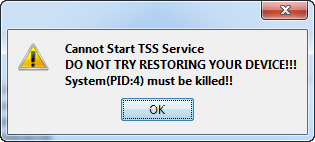
I verified this using netstat (netstat -aon | find /I “LISTENING” | find /I “:80”):

Remote Registry from 32 to 64 bit
Author: Remko Weijnen21 Oct
 Yesterday I needed to set a few registry keys remotely from a 32 bit windows machine to a 64 bit machine.
I used reg.exe to set the key but even though it returned success the key wasn’t altered.
As I suspected the key was written to the Wow6432Node. In the help I couldn’t find any switch to force reg.exe to use the 64-bit view.
On a 64 bit machine this is not a problem since both 32- and 64 bit versions of reg.exe exists. The 32 bit version of reg.exe defaults to the 32 bit view and the 64 bit version defaults to the 64 bit view.
But luckily reg.exe has a switch (that is not listed in the help) to force the View:
Prevent additional IP addresses from being registered in DNS
Author: Remko Weijnen18 Oct
 In Windows 7 and 2008 R2 all IP Addresses are by default registered in DNS.
If you don’t want certain IP addresses to appear in DNS you can alter this behavior with Netsh using the skipassource flag.
Use the following syntax to add an additional IP Address with skipassource flag:
Profile



Top Posts
- Query Active Directory from Excel
- RNS 510 Startup Logo–My thoughts
- Adding a hidden Exchange mailbox to Outlook
- How rdp passwords are encrypted
- Get Actual CPU Clock Speed with PowerShell
- ClickOnce Applications in Enterprise Environments
- VW RNS 510 Navigation Startup Pictures
- Unattended Installation of IBM System i Access for Windows
- Reading physical memory size from the registry
- Show Client IP Address when using NetScaler as a Reverse Proxy
Recent Comments
Featured Downloads
- AClientFix (13595 downloads )
- AddPrinter2.zip (12854 downloads )
- AdProps (12379 downloads )
- AdSample1 (11432 downloads )
- AMD Radeon Crimson ReLive (30072 downloads )
- Atheros Driver (34019 downloads )
- AutoLogonXP 1.0 (11404 downloads )
- CDZA (9560 downloads )
- ChDrvLetter.zip (11217 downloads )
- ChDrvLetter.zip (14356 downloads )
Blogroll
- Andrew Morgan
- Arnout’s blog
- Assa’s Blog
- Barry Schiffer
- Delphi Praxis
- Ingmar Verheij
- Jedi Api Blog
- Jedi API Library
- Jeroen Tielen
- Kees Baggerman
Categories
- .NET (4)
- Active Directory (28)
- Altiris (36)
- App-V (1)
- Apple (5)
- Application Compatibility (11)
- Automotive (5)
- AWS (1)
- BootCamp (1)
- C# (6)
- C++ (2)
- Citrix (87)
- Delphi (61)
- Embedded (4)
- Exchange (16)
- General (71)
- iPhone (5)
- Java (8)
- Linux (1)
- Lync (2)
- NetScaler (1)
- Oracle (4)
- Other (1)
- Packaging (19)
- PowerShell (56)
- Programming (79)
- Quest (1)
- RES (7)
- script (22)
- ShareFile (1)
- SQL Server (10)
- Strange Error (3)
- Terminal Server (68)
- ThinApp (3)
- ThinKiosk (1)
- Ubuntu (1)
- Unattended Installation (19)
- Uncategorized (51)
- UWP (2)
- Vista (37)
- Visual Studio (1)
- VMWare (26)
- Windows 10 (2)
- Windows 2003 (30)
- Windows 2008 (37)
- Windows 2008 R2 (16)
- Windows 2012 (2)
- Windows 7 (30)
- Windows 8 (4)
- Windows Internals (12)
- Windows XP (16)
Archives
- February 2023 (1)
- October 2022 (3)
- July 2022 (1)
- June 2022 (2)
- October 2019 (1)
- March 2018 (1)
- January 2018 (4)
- December 2017 (3)
- April 2017 (1)
- March 2017 (5)
- February 2017 (4)
- May 2016 (3)
- March 2016 (1)
- October 2015 (2)
- September 2015 (1)
- January 2015 (1)
- August 2014 (1)
- July 2014 (8)
- May 2014 (1)
- November 2013 (1)
- October 2013 (2)
- September 2013 (3)
- August 2013 (4)
- June 2013 (2)
- May 2013 (3)
- April 2013 (5)
- March 2013 (5)
- February 2013 (1)
- January 2013 (5)
- December 2012 (9)
- November 2012 (3)
- October 2012 (3)
- August 2012 (4)
- July 2012 (2)
- June 2012 (1)
- May 2012 (6)
- March 2012 (13)
- February 2012 (12)
- January 2012 (9)
- December 2011 (9)
- November 2011 (4)
- October 2011 (5)
- September 2011 (10)
- August 2011 (10)
- July 2011 (2)
- June 2011 (8)
- May 2011 (12)
- April 2011 (4)
- March 2011 (14)
- February 2011 (8)
- January 2011 (32)
- December 2010 (23)
- November 2010 (19)
- October 2010 (10)
- September 2010 (6)
- August 2010 (1)
- July 2010 (1)
- June 2010 (6)
- March 2010 (7)
- February 2010 (3)
- December 2009 (3)
- November 2009 (11)
- September 2009 (2)
- July 2009 (1)
- June 2009 (5)
- May 2009 (1)
- April 2009 (2)
- March 2009 (3)
- February 2009 (6)
- January 2009 (3)
- December 2008 (8)
- November 2008 (5)
- October 2008 (3)
- September 2008 (3)
- August 2008 (3)
- June 2008 (6)
- May 2008 (2)
- April 2008 (3)
- March 2008 (5)
- January 2008 (3)
- December 2007 (3)
- November 2007 (13)
- October 2007 (10)